

For phones, go with tempered glass that has an integrated blue-light filter. For laptops, an anti-blue PET film or removable overlay is your best bet. For desktop monitors, a clip-on or freestanding filter panel gives you the flexibility to remove it when colour accuracy matters.
Before you buy anything, check three things:
- Compatibility: does it fit your exact model, including camera cutouts and any case you use?
- Filtering claim: does the product state a specific wavelength range and percentage blocked, not just “filters blue light”?
- Returns policy: a reputable seller offers at least a 30-day return window; some offer considerably longer.
Table of Contents
- Do blue light screen protectors actually work?
- What are the main types and materials?
- How to install, remove and care for your protector
- What protectors will not do, and what else helps
- Key takeaways
- The case for buying what actually fits your device
- SmartProtectors blue-light protectors for UK buyers
- Useful sources and further reading
Do blue light screen protectors actually work?
The short answer: they filter a portion of short-wavelength light, which may help with sleep if you use screens late at night, but they are not a treatment for eye strain. The American Academy of Ophthalmology is clear that behavioural measures, regular breaks, correct screen distance, and good ergonomics, are the primary tools for reducing digital eye strain. A physical filter is an adjunct, not a cure.
The mechanism is straightforward. Blue-light screen protectors use one of three approaches: a tinted absorptive layer built into the film or glass, a reflective coating on the surface, or a combination of both. All three target the 380–500 nanometre range of the visible spectrum, where short-wavelength light is most concentrated. Products that claim to filter a portion of blue light are typically referring to this band, and a visible amber or yellow tint is usually the sign that the filter is doing something measurable.
Where the evidence gets more nuanced is on eye strain specifically. Digital eye strain, the tired, dry, sometimes blurry feeling after long screen sessions, is caused primarily by reduced blinking, fixed focal distance, and screen glare, not blue light alone. Filtering blue light does not fix any of those causes. For sleep, the picture is more promising: blue light suppresses melatonin production, and reducing exposure in the two hours before bed can support a more natural sleep onset.
Pro Tip: When reading a product page’s filtering claim, look for the wavelength range alongside the percentage. “Blocks 30% of blue light at 450nm” is a testable, specific claim. “Filters harmful blue light” with no figure is marketing copy, not a specification.
What are the main types and materials?
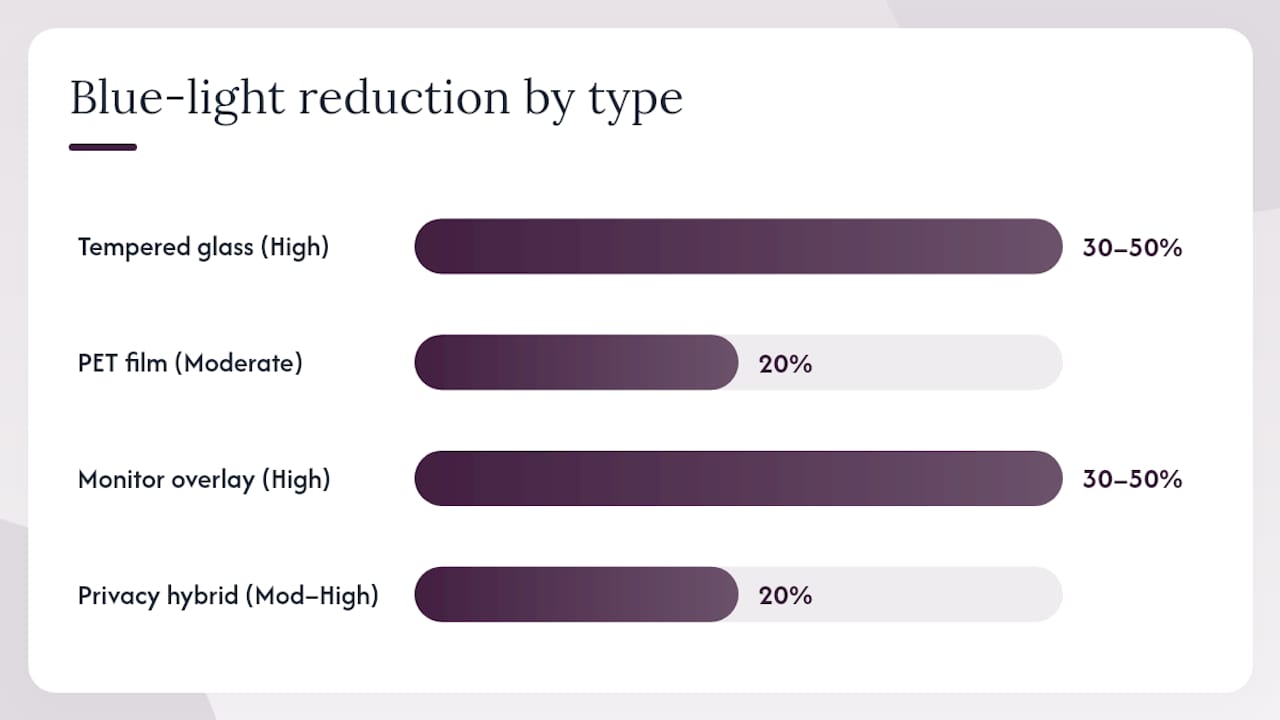
Tempered glass with an integrated filter is the most durable option for phones and tablets. The glass itself, typically rated at 9H hardness, resists scratches from keys and coins, and the blue-light layer is embedded rather than applied as a separate coating. The trade-off is a slight amber cast on the display, which some people find distracting on photo-editing or colour-sensitive work. SmartProtectors’ anti-blue tempered glass for iPad Pro is a good example of this category: full-coverage HD glass with the filter built in.
PET film (polyethylene terephthalate) is thinner, more flexible, and easier to apply without bubbles. Anti-blue PET films are common for laptops because they can cover larger surfaces without the weight or rigidity of glass. They scratch more easily than tempered glass, but they are also cheaper to replace. A matte anti-glare variant reduces reflections at the same time, which is useful in bright offices.
Removable monitor overlays are a different category entirely. These are rigid or semi-rigid panels that sit in front of your monitor, held by clips or a frame. Because they are not adhered to the screen, you can remove them instantly when you need accurate colour, for design work or video editing, for instance. They tend to reduce brightness noticeably, so ambient lighting matters.
Privacy/blue-light hybrid filters combine a micro-louvre privacy layer with blue-light filtering. They narrow the viewing angle so colleagues cannot see your screen from the side, while also reducing short-wavelength light. These filters can cause significant brightness loss, so they suit private offices more than open-plan desks.
Independent testing by ZDNET confirms that fit, colour fidelity, and case compatibility matter more to real-world satisfaction than the headline filtering percentage.
| Type | Durability | Blue-light reduction | Colour effect | Typical price band |
|---|---|---|---|---|
| Tempered glass (integrated filter) | High (9H) | 30–50% claimed | Amber tint | £8–£30 |
| PET anti-blue film | Moderate | 20% claimed | Slight warmth | £10–£20 |
| Removable monitor overlay | High (rigid panel) | 30–50% claimed | Yellow/amber shift, brightness loss | £20–£50 |
| Privacy/blue-light hybrid | Moderate–high | 20% claimed | Significant brightness loss | £30–£60 |
How to install, remove and care for your protector
The single most important step is a dust-free environment. Even one speck under a tempered glass protector creates a permanent bubble, and with PET film, it is even harder to fix after application.
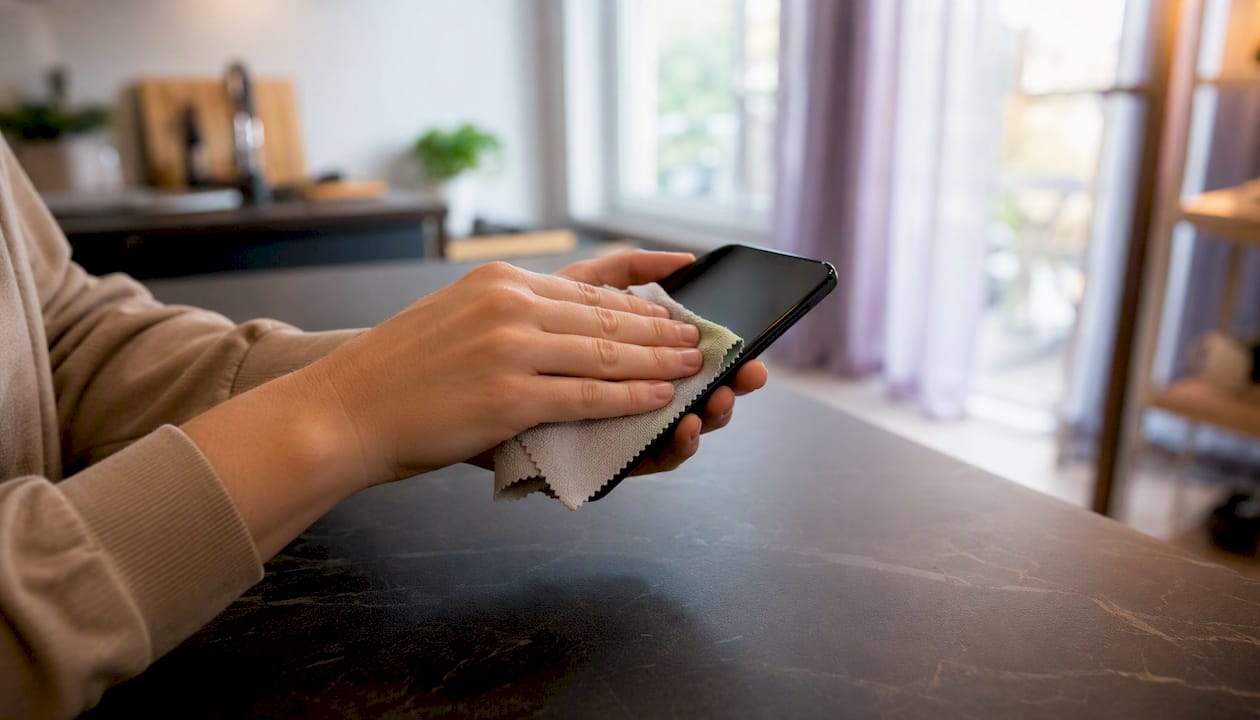
For phone tempered glass, clean the screen with the included alcohol wipe, then the microfibre cloth, and work in a room with low air movement. Peel the backing, align the protector to the earpiece or front camera cutout first, then lower it slowly. The adhesive does the rest. Do not press hard until you are satisfied with the alignment.
PET films for laptops are more forgiving because they are repositionable for a short window after application. Peel from one corner, align to the top edge of the display, and use a card to push out air as you lay it down. Removable monitor overlays need no adhesive at all; just clip them to the top bezel and check the panel sits flush.
Pro Tip: Avoid alcohol-based cleaners on the filter surface once installed. They can degrade the absorptive layer over time. Use a dry microfibre cloth for daily cleaning, and a slightly damp one for stubborn marks. Keep the protector away from sustained heat, such as leaving a phone on a car dashboard in summer, as heat accelerates the breakdown of the filter coating.
If touch sensitivity drops after fitting a tempered glass protector, check that the edges are fully adhered. A lifted corner creates an air gap that interferes with the capacitive layer. If the problem persists after pressing the edges down, the protector may not be the right thickness for your device.
When removing a protector, use a fingernail or a thin plastic card at a corner. Never use metal tools, which can scratch the screen underneath. PET films can often be recycled with soft plastics at supermarket collection points; check your local council’s guidance for tempered glass disposal.
What protectors will not do, and what else helps
A blue-light screen protector will not cure dry eye, will not correct a refractive error, and is not a substitute for medical advice if you have persistent visual symptoms. It filters part of the blue spectrum; it does not address blinking rate, focal strain, or posture, which are the main drivers of digital eye strain.
If a physical protector is not right for your situation, or you want to layer your protection, these alternatives are worth considering:
- Software night modes: Windows Night Light, macOS Night Shift, and Android’s built-in blue-light filter all shift the colour temperature of your display after sunset. They are free, reversible, and require no hardware.
- Dedicated filter apps: Night Filter gives you manual control over screen brightness and colour temperature beyond what the OS offers, with scheduling built in. The Android version on Google Play lets you set opacity and tint independently. Apps like Ember work similarly, with no account required and automatic sunset/sunrise scheduling.
- Blue-light glasses: spectacles with a blue-light coating are a wearable alternative that works across every screen you use, including TVs and e-readers. They are particularly useful for people who switch between multiple devices.
- The 20-20-20 rule: every 20 minutes, look at something 20 feet away for 20 seconds. This is the single most evidence-backed intervention for reducing digital eye strain, and it costs nothing.
The trade-off with stronger filtering, whether hardware or software, is colour accuracy. A 50% blue-light reduction will make whites look warm and yellows look orange. For creative professionals, that is a meaningful problem. For evening reading or general browsing, most people adapt within a day or two.
See an optometrist if symptoms persist despite making these changes. Persistent headaches, blurred vision, or eye pain after screen use can indicate an underlying condition that no filter will address.
Key takeaways
For phones, tempered glass with an integrated blue-light filter gives you the best combination of durability and filtering; for laptops and monitors, anti-blue PET film or a removable overlay is the more practical choice.
| Point | Details |
|---|---|
| Device-specific pick | Tempered glass for phones and tablets; PET film or removable overlay for laptops and monitors. |
| Check the specification | Look for a stated wavelength range (380–500nm) and a percentage blocked, not just a vague claim. |
| Behaviour matters more | Breaks, screen distance, and ergonomics reduce eye strain more reliably than any filter alone. |
| Colour trade-off is real | Stronger filtering means a warmer, amber-tinted display; test with a returns policy in place. |
| SmartProtectors for UK buyers | SmartProtectors stocks model-matched anti-blue tempered glass and PET options, with sourcing for hard-to-find devices. |
The case for buying what actually fits your device
Most of the frustration people report with blue-light protectors comes down to one thing: they bought the wrong size or the wrong type for their device. A protector that lifts at the corners, blocks a fingerprint sensor, or clashes with a case is not a blue-light problem. It is a compatibility problem.
SmartProtectors was built around exactly that gap. The catalogue covers a wide range of smartphones, tablets, smartwatches, laptops, and earbuds, including models that most generic retailers do not stock. If your device is not listed, the request-based sourcing service will find and add it. That is genuinely useful if you are on a less common Android model or an older iPad variant.
The brand’s approach to compatibility is methodical: product pages specify exact model fit, cutout positions, and case compatibility where relevant. For buyers who want to go deeper on material selection before ordering, the protector types guide on the SmartProtectors blog is a reliable starting point. Returns and exchanges are handled without the usual friction, which matters when you are buying a protector for a device you cannot easily test in a shop.
SmartProtectors blue-light protectors for UK buyers
SmartProtectors offers anti-blue tempered glass protectors for phones and tablets, including the full-coverage HD anti-blue glass for iPad Pro, and anti-glare PET films for laptops and larger devices. All products are model-matched, so you are not guessing at fit. Pricing sits at the affordable end of the market without sacrificing the 9H hardness or filter quality you should expect.
For laptop users, the anti-glare PET range reduces both reflections and blue-light exposure in one layer. For phone buyers who want the most durable option, the tempered glass range with integrated filter is the one to go for.
Browse the full range and check compatibility for your specific device at SmartProtectors. If your model is not listed, submit a sourcing request and the team will add it to the catalogue.
Useful sources and further reading
- Digital devices and your eyes — American Academy of Ophthalmology
- The best blue light screen protectors of 2023 — ZDNET
- Night Filter — full control of your screen’s brightness and colour
- Night Filter — Android app — Google Play
- Full coverage HD tempered glass screen protector for iPad Pro 11 and iPad Pro 12.9 with anti‑blue light filter — SmartProtectors
- Types of screen protectors and how to choose the one that best suits your needs — SmartProtectors