

Most iPad cases are model specific, not one size fits all, so the safest rule is to match your device’s A-number rather than trust the screen size alone. A handful of generations share an identical chassis and can use the same case (the 10.2-inch line is the classic example), but camera position, buttons, and magnet placement change enough between models that a case built for one iPad often won’t sit right on another. Check the A-number on the back of your iPad against the seller’s compatibility list before you buy.
TL;DR:
- Most iPad cases are model-specific, requiring verification of the A-number rather than relying solely on screen size to ensure proper fit.
- Checking the device’s A-number, camera position, and port access against the product listing is essential to avoid compatibility issues.
- The 10.2-inch iPad models (7th to 9th generation) share identical dimensions and can use the same case, unlike newer or separate lines like 10.9-inch, iPad Pro, or Mini generations.
- Visual similarities between models often mask internal design changes, such as camera, magnet, or button placement, which impact case fitability.
- Testing the case upon arrival with photos of misalignments and keeping the original packaging ensures easier resolution and returns if needed.
Table of Contents
- Quick checklist: five things to check before buying a case
- How to identify your iPad model and generation
- Which iPads commonly share cases
- Why some cases that look the same still won’t fit
- What to check on arrival and how to handle a poor fit
- How SmartProtectors supports correct-fit purchases
- Practical tips from device protection specialists
- Get the right case the first time, not the second
- Sources
Quick checklist: five things to check before buying a case
Before you click “add to basket,” run through these five checks. They take less time than reading the product description, and they’ll save you a return shipment.
- Find your A-number. It’s on the back of your iPad, or under Settings → General → About.
- Match it against the listing. A genuine product page names the exact A-numbers it fits, not just “10.2-inch iPad” or “fits most tablets.”
- Look at the photos properly. Check camera cut-outs, button positions, port access, and speaker holes against your own device.
- Check magnet and keyboard support. If you use a Smart Keyboard, Magic Keyboard, or Apple Pencil, confirm the case doesn’t block the connector or magnetic strip.
- Read the returns policy first. A seller confident in their compatibility chart will offer a straightforward fit guarantee.
Pro Tip: Screenshot the A-number and the product listing before you order. If the case doesn’t fit, you’ve got proof of what you bought and what you expected in seconds, not a five-minute hunt through your order history.
Sellers who genuinely understand iPad case compatibility charts list A-numbers explicitly rather than relying on vague screen-size descriptions, and that’s the single biggest tell of a reliable listing.
How to identify your iPad model and generation
Every iPad carries a model number that pins down exactly which generation, screen size, and connectivity option you own. It’s the only detail that removes guesswork from case shopping.
- Open Settings → General → About, then tap the line labelled “Model Name” or the model number itself. Tapping it once usually reveals the full A-number (something like A2270).
- Turn the device over. The A-number is stamped in small print on the back, near the bottom or centre depending on the generation.
- Use screen size as a first filter, then confirm with the A-number. A 10.2-inch and 10.9-inch iPad look deceptively similar in photos, but they are different devices with different button and camera layouts.
- Cross-reference that number against the compatibility list on the case’s product page or against Apple’s own model identification guide.
This four-step process works whether you’re buying your first iPad case or replacing one after five years of daily use. It also answers a question a lot of buyers ask by analogy from phones: does an S23 case fit an S24, or does an iPhone 13 case fit a 14? The answer for both Samsung and Apple phones is almost always no once the chassis changes, and iPads follow the same logic.
Which iPads commonly share cases
Compatibility groups exist, but they’re narrower than most people assume. Here’s how the major iPad families actually break down.
- 10.2-inch group (7th, 8th, and 9th generation). These three generations share identical chassis dimensions and camera and button placement, so a case built for one genuinely fits all three. This is the most forgiving compatibility group in Apple’s entire tablet range.
- 10.9-inch split (10th generation onward). Despite a screen diagonal close to the 10.2-inch models, the 10th generation moved the camera, relocated the power button, and switched to USB-C, so it needs its own case. Don’t assume “10-inch-ish” means interchangeable.
- iPad Pro and Air (11-inch and 13-inch). Even where the screen diagonal matches exactly, an iPad Pro 13-inch case is generally not interchangeable with an iPad Air 13-inch case, because thickness, magnet arrays, and accessory attachment points differ between the two lines.
- iPad mini generations. Mini 4 through mini 6 changed body dimensions and button layout enough that cases rarely cross generations, even though they all share the “mini” name.
- Specialist and rugged cases. Mounting cradles and medical-grade cases, like the kind used in clinical or field settings, tend to publish precise A-number compatibility lists because a loose fit in a dock is a functional failure, not just cosmetic.
If you own one of the 10.2-inch models, a well-made leather case for the 10.2-inch iPad will genuinely serve all three generations without any fitting drama.
Why some cases that look the same still won’t fit
The visual similarity between iPad generations hides a surprising amount of internal redesign, and that’s where most compatibility disappointments come from.
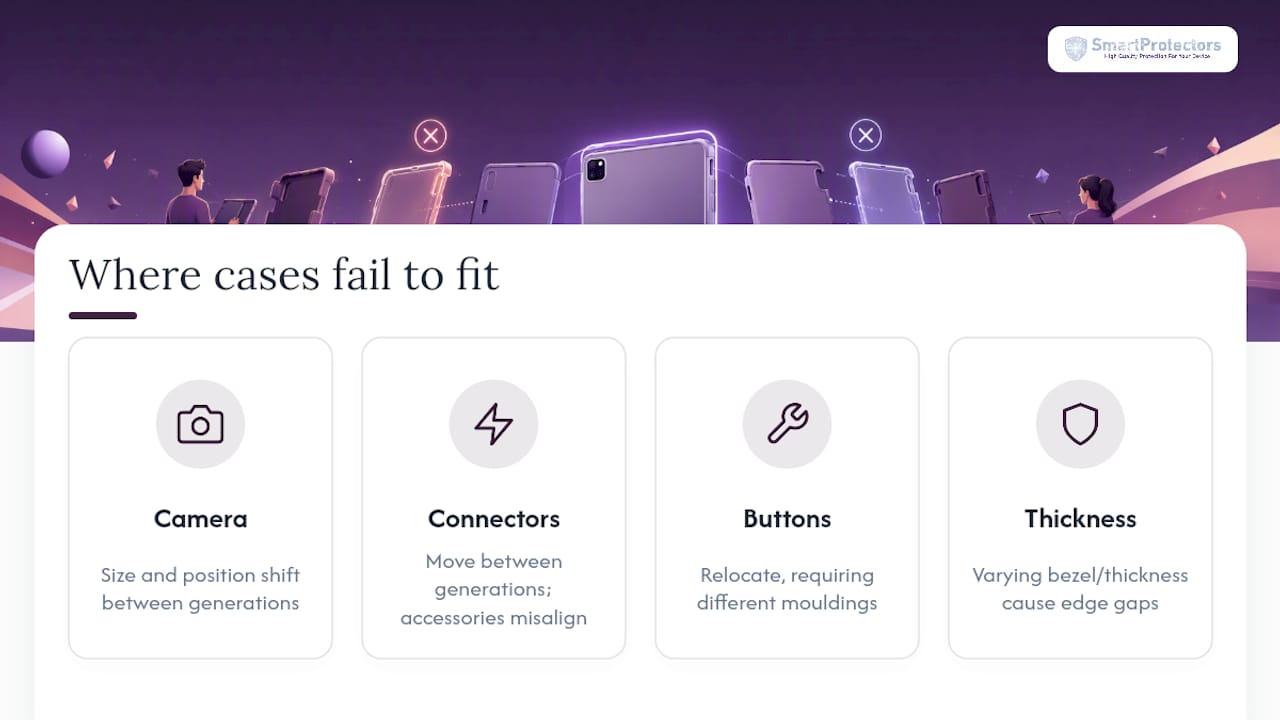
Camera modules change size and position more often than people expect, and even a millimetre of offset means the cut-out in a case misaligns with the lens. Sleep and wake magnets and Smart Connector arrays move between generations too, which is why a case that grips one iPad perfectly can leave a Magic Keyboard or Smart Folio unable to attach on another. Button and port relocations are the other silent culprit: a volume rocker or Lightning-to-USB-C switch shifts the moulding needed for that model. Thickness and bezel width also vary, so a case might slide onto the wrong iPad and still leave gaps at the edges that undermine drop protection.

What to check on arrival and how to handle a poor fit
Buying the right case starts on the product page and ends with a five-minute check once the parcel arrives.
- On the product page, look for an explicit A-number list, close-up photos of the camera and button cut-outs, and a clear statement about keyboard or magnet support if you use Apple accessories.
- When the case arrives, fit it gently, then test the sleep/wake button, volume controls, camera access, and charging port before you commit to daily use.
- Photograph any misalignment with a timestamp, particularly around the camera cut-out or button placement, in case you need to request a refund.
- If the fit fails, contact the seller with your iPad’s A-number and the photos. A seller who published a proper compatibility chart will resolve it quickly.
Pro Tip: Keep the original packaging until you’ve tested every button and port. Most returns policies require it, and you’ll want it if the case needs to go back.
How SmartProtectors supports correct-fit purchases
SmartProtectors builds every product listing around the model numbers that actually matter, not generic screen-size labels, and the catalogue covers hard-to-find iPad, iPhone, and Android models that many retailers skip entirely. If your exact model isn’t listed, the site’s request system lets you ask directly, and the team sources and adds it to the catalogue rather than leaving you to guess.
Three products worth knowing about if you’re shopping right now:
- The Literature and Art Simple Tablet Case with Pen Tray suits anyone who uses an Apple Pencil regularly and wants dedicated storage rather than a loose pocket.
- The Silicone Dreamy Sailing waterproof cover fits buyers who need genuine water resistance alongside a distinctive design, not just a bit of splash tolerance.
- The Compatible Flat Anti-Falling Jacket works as a slim, everyday option for people who want drop protection without adding bulk.
Confirm your A-number first, then check it against the compatibility field on each product page before ordering.
Practical tips from device protection specialists
The most persistent mistake buyers make is assuming a shared screen size guarantees a shared case, when in reality the internal layout is what decides fit. Magnet alignment and keyboard support catch out even careful shoppers, because those details rarely show up in a listing’s headline photo.
If you use your iPad mostly at a desk with a keyboard attached, a folio case makes more sense than a slim shell. If you’re carrying it around daily, a slim case reduces bulk without sacrificing much drop protection. Either way, the decision that actually matters happens before you add anything to your basket: confirming the A-number, not the inch measurement, against what the case claims to fit.
— Dian
Get the right case the first time, not the second
SmartProtectors exists for exactly the problem this article walks through: matching real device model numbers to genuine compatible cases, rather than hoping a screen-size label is close enough. The catalogue is built around A-number accuracy, and it stretches well beyond the mainstream models most retailers bother stocking.

Whether you’re after the Literature and Art Simple Tablet Case for pen storage, the waterproof Silicone Dreamy Sailing cover, or the slim Compatible Flat Anti-Falling Jacket, every listing states the exact models it fits. Pair a case with a tempered glass screen protector for iPad Air if you want full-device coverage in one order, and if you use a keyboard accessory, a wireless keyboard case for iPad Pro shows how magnet and connector compatibility should be listed properly. Can’t find your exact model? Submit a request through the site and the team will source it. Check your A-number, search it on SmartProtectors, and order with confidence that what arrives is what you were shown.
Sources
- iPad case compatibility (Apple Discussions)
- iPad sizes/case compatibility (Apple Discussions)
- Apple Support (identify your iPad model)