

Your phone case is not the reason your handset feels hot. That job belongs to the chipset, the battery and the charging circuit. But a case can absolutely make a bad situation worse by trapping the heat those components produce, and in a handful of common scenarios, thick or insulating cases turn a warm phone into a genuinely overheating one. Internal temperatures under heavy load can climb to high levels, reaching the range where your phone’s own protection system, thermal throttling, activates to slow things down.
If your phone feels alarmingly hot right now, do this in the next two minutes:
- Take the case off. It costs nothing and removes one variable immediately.
- Stop charging. Unplug the cable, especially if you’re fast charging or using a wireless pad.
- Move out of direct sun or a hot car. Ambient heat compounds everything else.
If you see swelling, smell burning, or spot smoke, put the phone down, do not charge it, and get it to a repair specialist straight away. That’s not a case problem anymore, that’s a battery safety issue, and organisations like SmartProtectors that sell protective accessories will tell you the same thing: a case protects against drops and scratches, not against a battery in distress.
Key Takeaways
Phone cases rarely generate heat themselves, but thick or insulating materials can trap the heat your phone already produces, especially during fast charging, wireless charging, and extended gaming.
| Point | Details |
|---|---|
| Cases trap heat, don’t create it | Chips, batteries, and chargers generate the heat; insulating case materials just slow its escape. |
| Watch high-risk scenarios | Fast charging, wireless charging, and long gaming sessions are when case material matters most. |
| Material choice matters | Silicone and TPU retain more heat than thin PC shells or metal, based on measured thermal conductivity. |
| Run the A/B test yourself | Fifteen minutes with the case on, fifteen minutes off, same task, tells you what your phone actually does. |
| Know the danger signs | Swelling, smoke, or a burning smell mean stop charging immediately and get professional repair. |
| Choose slim, compatible designs | SmartProtectors stocks slim PC/TPU hybrid and airbag-corner cases built to avoid unnecessary insulation. |
Publisher perspective and next step for readers
SmartProtectors builds its case range around the same principle this guide argues for: protection shouldn’t come at the cost of your phone doing what it’s designed to do, including managing its own heat. That’s why the catalogue leans toward slim hybrid shells and precision-fit designs rather than bulky universal armour, and why requests for hard-to-find models get sourced rather than substituted with an ill-fitting alternative. If you’ve run the test above and found your case is part of the problem, browse the curated categories or get in touch to find something that fits both your phone and how you actually use it.
Soft product offer matching the article’s recommendations
If the checklist above sounds like what you’re after, slim, vented where possible, and free of metal near the charging coil, that’s exactly the category SmartProtectors focuses on. Every case is matched to a specific device model, so you’re never guessing whether the fit and the cooling trade-offs will work for your phone. Visit the SmartProtectors shop to find a case built for your exact model, or check the budget-friendly options if you want the same slim-profile approach without the premium price tag.
Table of Contents
- How phone case overheating actually works: the simple physics
- When does a case make overheating noticeably worse?
- Phone case material heat resistance: what actually traps heat
- Do heat‑dissipation and active cooling cases actually work?
- A simple test to check if your case is causing overheating
- How to prevent overheating without giving up your case
- Warning signs your phone’s overheating is a real danger
- What to look for in a case that won’t make things worse
- Why the “case versus no case” debate misses the point
- Frequently asked questions
- Sources
How phone case overheating actually works: the simple physics
Your phone generates heat from three main sources: the system-on-chip doing the processing, the battery discharging or charging, and the power management circuitry converting electricity. None of that changes because you’ve put a case on. What changes is how efficiently that heat escapes once it’s made.
Phones are engineered to shed heat through the metal frame, the glass back, and the surrounding air. Cover those surfaces and you interfere with the phone’s intended heat dissipation paths. Manufacturers design the metal frame specifically to help heat escape into the surrounding air, and wrapping that frame in an insulating material slows that route down, according to reporting on smartphone thermal design.
Two physical processes are doing the work here, and they behave differently once a case enters the picture:
- Conduction is heat moving through direct contact, from the chip to the frame, from the frame to whatever is touching it. A case adds another layer the heat has to pass through before reaching the air.
- Convection is heat moving into moving air. A phone lying flat with no case has air circulating over more of its surface. A thick case with a tight grip reduces that exposed surface area and slows the airflow that would otherwise carry heat away.
Here’s a comparison that makes the difference obvious. Scroll on social media for twenty minutes with a case on and you’ll barely notice any warmth. Play a demanding game for the same twenty minutes and the difference between a bare phone and a caseless one becomes obvious fast, because gaming pushes the chip much harder and generates far more heat that needs somewhere to go. Idle use barely generates enough heat for a case to matter. Sustained high load is where case choice starts to count.
When internal temperatures climb too high, your phone doesn’t just get uncomfortably warm, it deliberately slows itself down. This is thermal throttling, and it’s a protective feature, not a fault. The processor reduces its clock speed, the screen might dim, and performance drops until temperatures fall back into a safe range. A case that traps heat can trigger this throttling sooner and more often, which is why a caseless phone sometimes runs a demanding app noticeably smoother than the same phone wearing a thick case.
When does a case make overheating noticeably worse?
Not every situation puts your case under the same amount of pressure. Some combinations of use and case design are genuinely higher risk than others, and recognising which one you’re in tells you exactly what to do.
-
Fast charging. Rapid charging generates more heat at the battery and the charging circuit than a standard charger does. A thick case sitting between that heat source and the outside air slows heat escape right when the phone is producing the most of it. Action: take the case off while fast charging, particularly overnight or during a top-up before you head out.
-
Wireless charging. Charging coils generate their own heat, and a case with metal inserts, a kickstand bracket, or a thick magnetic ring sitting near the coil can both reduce charging efficiency and trap the resulting heat against the phone’s back. Action: check your case is genuinely wireless-charging compatible, and remove it if charging feels slow or the phone gets hot on the pad.
-
Prolonged gaming or video recording. Sustained high-resolution recording or graphically demanding games keep the chip at near-maximum output for extended periods. Action: take the case off for long sessions, or at least take a five-minute break every half hour to let heat dissipate.
-
Direct sunlight or a hot car interior. Ambient temperature does most of the damage here, and a case adds insulation on top of an already hot environment. Action: never leave your phone on a dashboard or in direct sun, case or no case.
-
Tight pockets or bags. Fabric pressed against a case blocks the small amount of airflow that would otherwise help, especially if the phone is also charging via a power bank in the same pocket. Action: give your phone breathing room, particularly during warmer months.
Combinations stack the risk. Fast charging inside a thick case on a hot day in direct sunlight is about as bad as it gets for a smartphone’s thermal management, and each factor alone might be manageable, but together they push temperatures toward the range where throttling, or worse, becomes likely.
Phone case material heat resistance: what actually traps heat
Material choice is where most of the real difference between cases lies, and it’s worth understanding before you buy your next one. Not every case behaves the same way once your phone starts working hard.
- Silicone and TPU. The most common case material, and also one of the least efficient at moving heat. Silicone and TPU have thermal conductivity of roughly 0.15 to 0.3 W/m·K, which is low compared with metal or hard plastics. That means heat generated inside the phone has a harder time escaping through a silicone shell. Good grip and drop protection, weaker on heat.
- Thick rubber cases. Rugged, heavily padded rubber cases offer excellent shock absorption but compound the insulation problem further. Great for building sites and toddlers, less great for marathon gaming sessions.
- Leather and PU leather. Behaves similarly to silicone in terms of heat retention, though it’s usually thinner than a rugged rubber case, which helps slightly. The trade-off is mostly aesthetic and tactile rather than thermal.
- Hard polycarbonate (PC). Thinner PC shells conduct a bit more heat to the surface than silicone does, and they add less bulk overall, so heat has a shorter path to travel before reaching the air.
- Thin PC/TPU hybrids. A slim hybrid shell keeps drop protection while minimising the insulating layer, which is why this category tends to be the sensible middle ground for most people.
- Metal. Aluminium and other metals conduct heat away faster than any plastic or rubber, but that efficiency has a downside: the case itself gets noticeably hotter to the touch, and metal can interfere with wireless charging or antenna performance depending on design.
- Composite materials (carbon fibre, aramid fibre). Thin, rigid, and generally better at shedding heat than thick rubber, though far less common and usually pricier.
- Vented or perforated designs. Cutouts around the camera, speaker, or back panel let a little more air move across the phone’s surface, which helps convection even if the material itself is silicone or TPU.
Pro Tip: Don’t chase the single “coolest” material at the expense of everything else. If you drop your phone often, a thin PC/TPU hybrid case still protects the corners without the bulk of full rubber armour, and that balance matters more day to day than shaving off a degree or two during the odd gaming session.
Do heat‑dissipation and active cooling cases actually work?
Specialised cooling cases are a real category, not just marketing, but their usefulness depends heavily on what you’re doing with your phone.
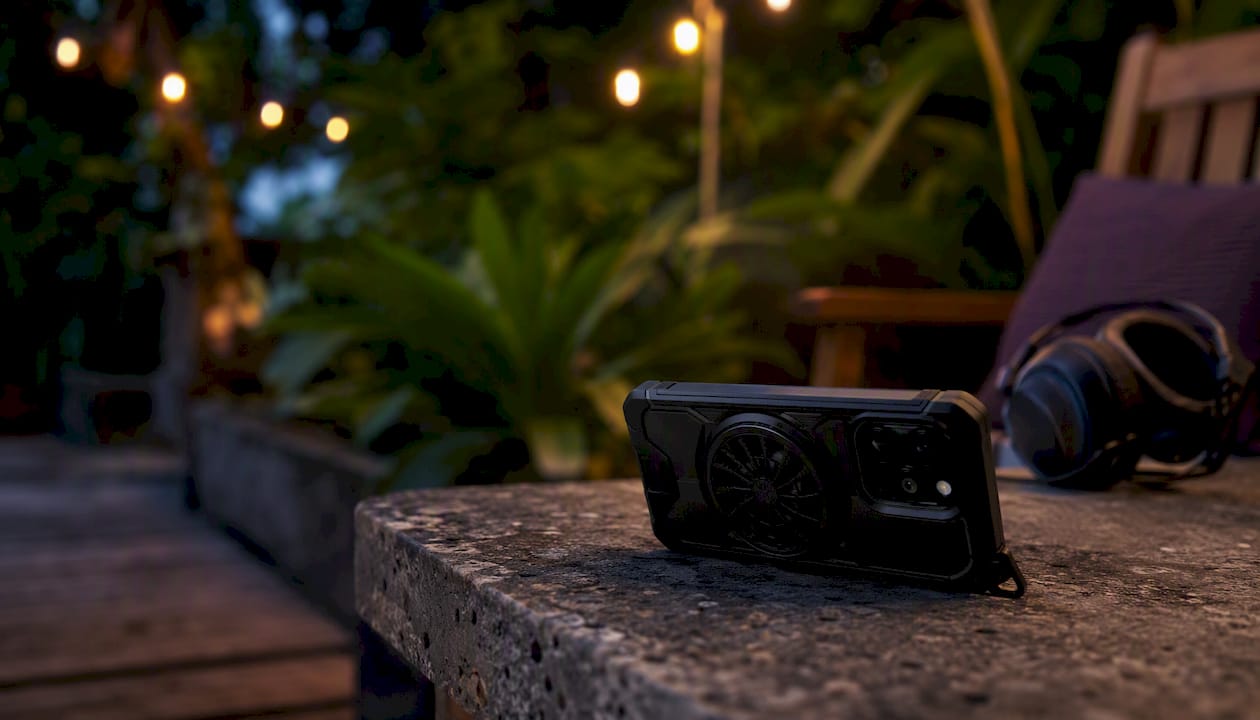
They genuinely help if: you’re a mobile gamer running graphically intensive titles for an hour or more at a time, or you livestream from your phone with the screen on and the camera recording continuously. In both cases, sustained heat generation is the whole problem, and anything that actively pulls heat away addresses it directly.
They’re marginal for: everyday use like browsing, messaging, or the occasional short video call. If your phone barely gets warm doing normal tasks, a cooling case is solving a problem you don’t have.
The catch with most of these products is size and trade-offs. A case with a built-in fan adds bulk, needs its own power source (usually a small battery or a USB connection), and introduces noise that some people find distracting during calls. Passive options, thermal pads or heat-spreading metal plates built into the case, help a little without the bulk, but their effect shrinks fast when the room itself is hot, because there’s nowhere for the heat to actually go once it reaches the plate. An active fan clipped to the back of your phone during a two-hour gaming tournament is a reasonable purchase. The same fan clipped on for a train journey spent scrolling social media is dead weight.
A simple test to check if your case is causing overheating
You don’t need a lab to find out whether your specific case is making your specific phone run hotter. A basic A/B comparison, run twice, gives you a clear answer within about half an hour, and it beats guessing based on how the phone feels in your hand.
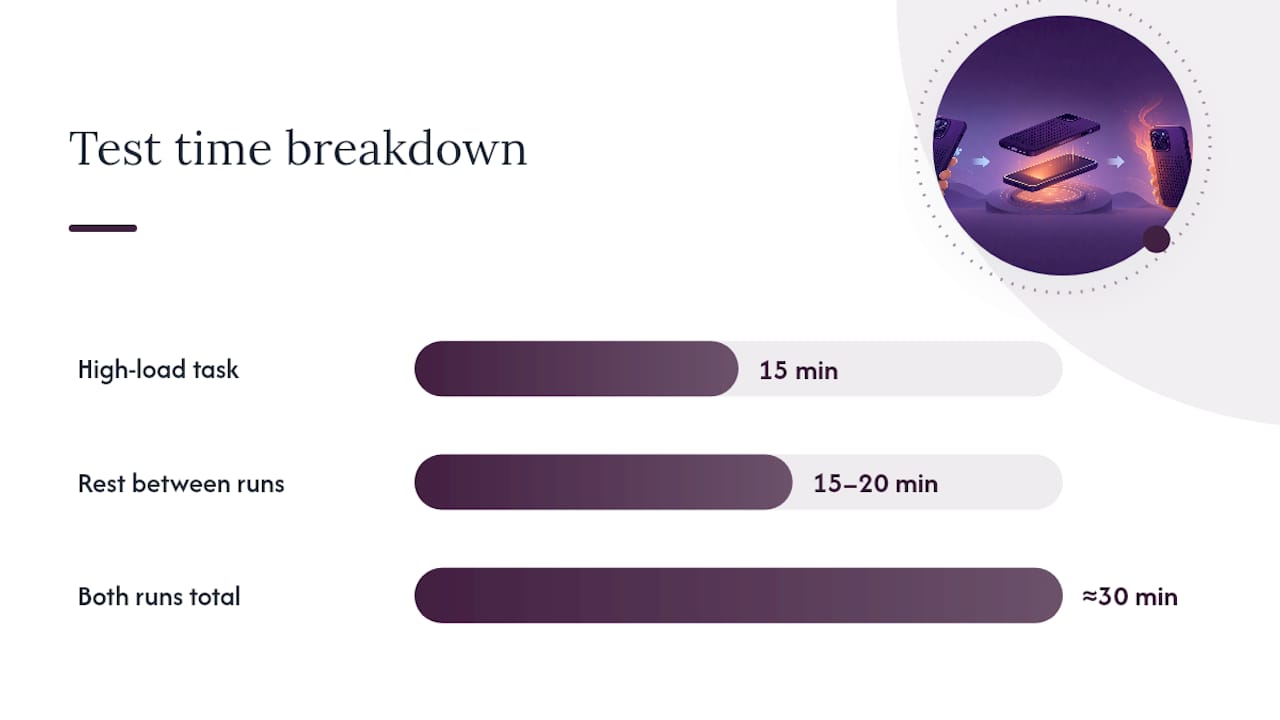
- Pick a repeatable high-load task. Fifteen minutes of a demanding game, or fifteen minutes of continuous 4K video recording, works well because both push the chip hard and consistently.
- Control the environment. Same room, same ambient temperature, same charger if charging is involved, and close background apps so they don’t skew the result.
- Run the task with the case on. Note the time you start and stop.
- Let the phone cool back to room temperature. Give it fifteen to twenty minutes of rest before the second run.
- Run the identical task with the case off. Same duration, same settings, same location.
- Compare readings. A difference of a few degrees between the two runs tells you the case is having a measurable effect, and consistently higher throttling or slower performance with the case on confirms it.
For measurement tools, most phones let you check battery and thermal status through built-in diagnostics or third-party apps that read SoC temperature and battery statistics, though exact figures vary by manufacturer and Android’s reporting is generally more detailed than iOS. A simple infrared thermometer aimed at the back of the phone also works if you want a repeatable external reading, and it avoids relying on software that some phones restrict. Either method tells you more than guessing based on how the case feels in your hand.
Here’s a simple record sheet you can copy into your notes app before you start:
Results genuinely vary by phone model, because manufacturers engineer heat paths differently across devices, so a case that runs cool on one handset might behave differently on another. Running the test yourself on your own phone is the only way to know for certain, rather than relying on someone else’s experience with a different model.
How to prevent overheating without giving up your case
You don’t have to choose between protecting your phone and keeping it cool. A few habits during the situations that matter most cut the risk substantially while leaving your case on the rest of the time.
During charging:
- Remove the case for fast charging sessions, particularly if charging overnight.
- Avoid wireless charging with cases that have thick metal inserts or kickstand brackets.
- Use the charger that came with your phone, or one that meets the manufacturer’s official specification, since cheap third-party chargers can run hotter and less efficiently.
During gaming or heavy use:
- Take a five-minute break every thirty minutes during long sessions.
- Drop graphics settings a notch if the phone starts feeling warm.
- Close background apps you’re not using, since each one draws processing power even when you’re not looking at it.
During storage and everyday carrying:
- Never leave your phone on a dashboard, windowsill, or anywhere in direct sun.
- Avoid tight pockets or bags during hot weather, especially with a power bank nearby.
- Let your phone rest somewhere ventilated if it’s already warm rather than tucking it away immediately.
A short checklist for the moments that matter most:
- Charging fast or wirelessly? Take the case off.
- Gaming past thirty minutes? Take a break and check the case for warmth.
- Outdoors in summer? Keep the phone out of direct sun regardless of case.
- Phone already warm? Turn off GPS, hotspot, and unused background apps, and lower screen brightness.
None of this requires ditching your case permanently. It requires knowing which few moments actually put it under thermal pressure.
Warning signs your phone’s overheating is a real danger
Most warm phones are simply working hard, and cooling down within a few minutes once you stop demanding tasks or unplug the charger. A small number of warning signs mean something more serious is happening, and they deserve immediate action rather than a wait-and-see approach.
-
Battery swelling. A back panel that’s bulging, a screen lifting slightly at the edges, or a case that suddenly feels too tight are all signs the battery has physically swollen. Power the phone off immediately and don’t charge it again.
-
Smoke or a burning smell. This is an active fire risk. Move the phone away from anything flammable, do not touch the battery area directly, and if it’s safe to do so, move it outdoors.
-
Rapid, unexplained shutdowns. A phone that keeps switching itself off even during light use, well beyond normal thermal throttling behaviour, points to a hardware fault rather than a software quirk.
-
Surfaces too hot to comfortably hold. If the back of the phone is painful to touch rather than just warm, stop using it and let it rest somewhere cool and ventilated.
For any of these, power the device off, do not attempt to charge it, and take it to a qualified repair service or contact the manufacturer directly rather than opening it yourself. Lithium batteries under thermal stress are not something to troubleshoot at home, and a professional can assess whether the battery needs safe disposal rather than continued use.
What to look for in a case that won’t make things worse
A little label-reading and a few sensible questions at checkout go a long way toward avoiding case-related heat problems altogether. Here’s what actually matters:
- A slim profile. Thinner cases mean a shorter path for heat to travel before it reaches open air, and they add less insulation overall.
- A ventilated or partly exposed frame. Cases that leave the metal frame partially visible, or include cutouts near the camera and speaker, support the airflow your phone was designed around.
- Thin hard PC backs or thin TPU shells rather than thick rubber armour, unless you genuinely need rugged drop protection more than thermal performance.
- No metal inserts near the wireless charging coil. Check the product description specifically if you charge wirelessly regularly.
- Confirmed wireless charging compatibility, stated clearly by the retailer rather than assumed.
These aren’t abstract features. A clear PC/TPU hybrid case with reinforced airbag corners delivers drop protection at the corners, where damage actually happens, without wrapping the whole back and frame in thick insulating material. A slim 3D-textured case keeps bulk down for anyone who wants a bit of personality without adding an insulating layer. If leather styling appeals to you more than clear plastic, a drop-proof leather case sits in the same thermal territory as silicone but with a different feel and finish. For accessory pairings, a silicone phone holder works well alongside a slim case for anyone who mounts their phone in a car, where ventilation matters just as much as it does in your hand.
Why the “case versus no case” debate misses the point
Most advice on phone case overheating treats it as a binary choice: keep the case on and accept the risk, or take it off and accept the scratches. That framing gets the priorities backwards. The real question isn’t whether to use a case, it’s whether you’re using the right case for what you actually do with your phone.
Someone who scrolls social media and checks emails all day is never going to generate enough heat for case material to matter. Someone who games for two hours a night on a demanding title is in a completely different situation, and pretending a slim TPU shell behaves the same way for both people is where a lot of generic advice falls down. The material science backs this up clearly: silicone’s low thermal conductivity is a real, measurable property, not a myth, but it only becomes relevant once the phone is actually working hard enough to need that heat to escape somewhere.
What gets underestimated is how much environmental factors dwarf case choice in most overheating complaints. A phone left on a car dashboard in July will overheat regardless of what’s wrapped around it, and blaming the case in that scenario misses the actual cause entirely. The case matters at the margins, during fast charging, during extended gaming, during wireless charging with the wrong design, but it’s rarely the primary villain people assume it to be. Run the A/B test on your own phone before you decide your case is the problem. Nine times out of ten, you’ll find the real culprit is how and where you’re using the phone, not what’s covering it.
Get case protection that won’t work against your phone’s cooling
SmartProtectors focuses on protection that fits the phone it’s made for, not bulky one-size-fits-all armour that traps heat you don’t need trapped. That means slim PC/TPU hybrid options, clear airbag-corner designs, and thin leather-style covers built to the exact dimensions of your model, so you’re not paying a thermal penalty for drop protection you’d get from a slimmer design anyway.

If you game heavily or charge wirelessly often, a clear PC/TPU case with airbag corners gives you corner-impact protection without wrapping the whole back in insulating bulk, and it’s built for specific models rather than a generic stretch-fit shell. Can’t find your exact phone, tablet, or earbuds model in the catalogue? Submit a request through the SmartProtectors site and the team will source and add it. Browse the current range and find a case that protects your device without fighting its own cooling.
Frequently asked questions
Does a phone case actually cause overheating? No, not on its own. The heat comes from the chip, battery, and charging circuit. A case can trap that heat and make an already-hot situation worse, particularly with thick or insulating materials.
Why is my phone hot even without a case? Heavy gaming, video recording, direct sunlight, and fast or wireless charging all generate heat regardless of whether a case is on. If your phone runs hot without one too, the case was never the primary cause.
What’s the best phone case material for heat dissipation? Thin hard PC shells and metal conduct heat away faster than thick silicone or rubber, though metal can feel hotter to the touch. Slim PC/TPU hybrids offer a practical middle ground for most people.
Should I remove my case while charging? It’s a sensible precaution during fast charging or wireless charging, especially if your case has metal inserts or a thick profile, since both can trap heat right where the charging circuit needs it to escape.
Do cooling phone cases with fans actually work? They help meaningfully for sustained high-load tasks like mobile gaming or livestreaming, but they add bulk, noise, and often need their own power source. For everyday use, they’re solving a problem most people don’t have.
Sources
The claims in this guide draw on established technology journalism and materials-focused reporting rather than assumption, and it’s worth checking these directly if you want the fuller technical detail.
- Do Phone Cases Cause Overheating? Unpacking the Truth About Smartphone Heat and Cases
- Covers can overheat the phone: the materials that heat the most and the least, from TPU to metal
- BBC article (technology/business coverage)