

For most UK tablet users, a medium-grain matte film or a removable magnetic sheet is the best paperlike alternative. If display clarity and colour accuracy matter more than maximum friction, a matte-coated tempered glass is the smarter call.
Quick shortlist:
- Note-taking (speed over precision): Entry-level or medium-grain matte film, budget-friendly, widely available
- Precision line art / illustration: Medium-grain matte film or removable magnetic sheet for testable friction
- Colour-critical work (photo editing, design review): Matte-coated tempered glass or clear glass with no texture layer
- Mixed use (drawing and media consumption): Removable magnetic sheet, so you can pull it off for films and reattach for sketching
SmartProtectors stocks model-specific options for UK buyers, and returns or trial policies matter here more than almost any other accessory purchase. Texture is personal; buy by bottleneck, not by brand name.
Table of Contents
- How do the main alternatives compare at a glance?
- What counts as a paperlike alternative?
- How does texture intensity affect your writing and drawing?
- How do you pick the right alternative?
- What should UK buyers check before ordering?
- Which alternatives are worth buying in the UK?
- What should you buy first?
- Key takeaways
- A note on choosing well
- SmartProtectors: model-specific options for UK buyers
How do the main alternatives compare at a glance?
| Category | Best for | Texture / friction | Display clarity | Scratch resistance | Price (UK) | Model fit & availability | Installation |
|---|---|---|---|---|---|---|---|
| Matte film (adhesive) | Note-taking, illustration | Light to heavy | Moderate loss | Good (scratch only) | Budget–mid | Wide; check model cut-out | Moderate; single-use |
| Textured / etched tempered glass | Illustration, daily protection | Medium | Slight loss | Excellent | Mid–premium | Growing; model-specific | Easy; rigid alignment |
| Matte-coated tempered glass | Colour work, mixed use | Light | Minimal loss | Excellent | Mid–premium | Wide | Easy |
| Removable magnetic / static sheet | Mixed use, texture testing | Light to medium | Minimal when removed | Low (film only) | Mid | Limited; check compatibility | Very easy; reusable |
| Clear tempered glass | Media, colour accuracy | None | Best | Excellent | Budget–mid | Very wide | Easy |
Most consequential trade-offs:
- Control vs clarity: Heavy-texture matte film gives the most paper-like stroke stopping but softens highlights and reduces contrast noticeably. Light-texture or matte-coated glass keeps colours punchy.
- Tip wear: Heavy texture accelerates stylus tip wear; budget for replacement tips if you draw daily.
- Replaceability: Adhesive films are single-use. A bad install means buying again. Magnetic sheets sidestep this entirely.
What counts as a paperlike alternative?
The term covers four distinct product types, and they behave very differently in use.
Matte adhesive film is the closest match to the original Paperlike experience. A roughened plastic layer bonds directly to the screen and adds friction for the stylus. Branded matte films often include two films per pack, which matters because installation is a one-shot process. Best for fast note-taking and everyday illustration where some clarity loss is acceptable.
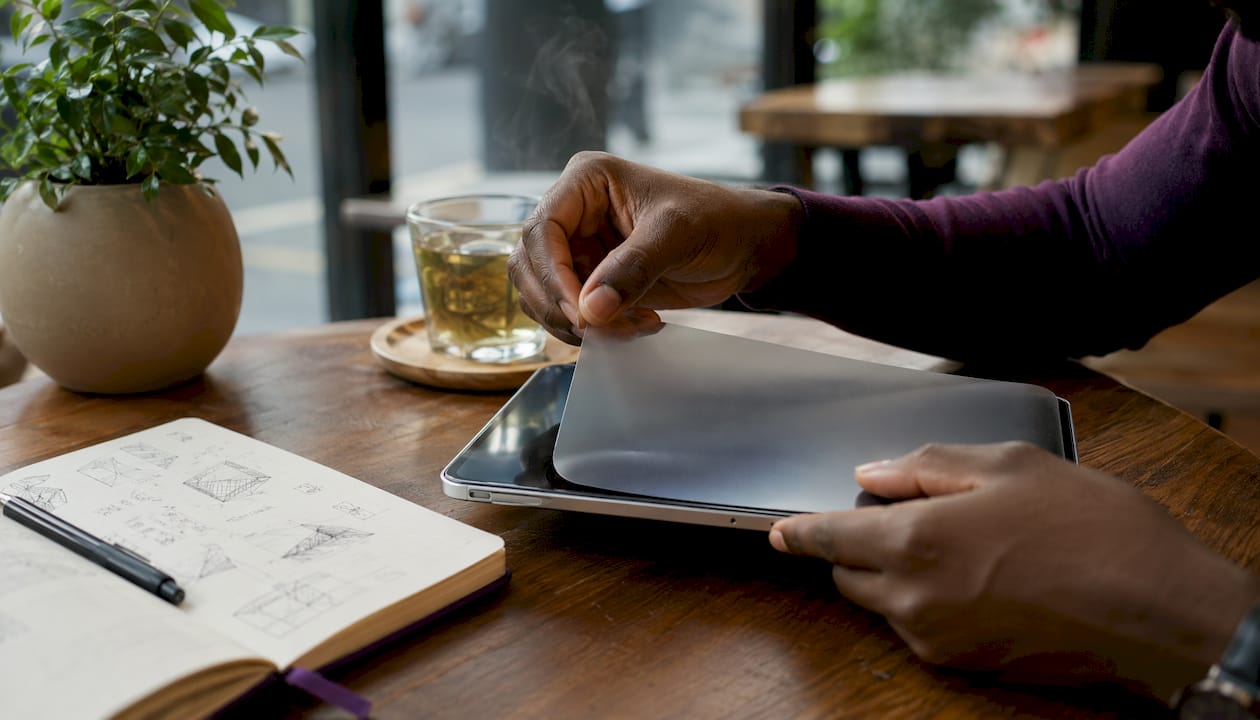
Magnetic or static-cling removable sheets attach without adhesive and peel off cleanly. The key advantage is flexibility: remove it for a film, reattach it for a sketching session. Removable solutions reduce the long-term clarity trade-off because you are not permanently altering the screen. Increasingly popular with users who split time between drawing and media consumption.
Textured or etched tempered glass combines drop protection with a matte surface. The texture is typically less pronounced than a dedicated matte film, but the glass base preserves more contrast. Good for illustrators who also want impact resistance.
Matte-coated tempered glass applies a fine anti-reflective coating over standard glass. Friction is subtle rather than papery, but colour accuracy stays close to bare screen. The right pick for designers who need glare reduction without sacrificing display fidelity.
There is also a fifth option worth knowing: a smooth desk writing surface or desk pad for users who prefer not to alter the screen at all. It does not replicate on-screen texture, but it removes the need to touch the display entirely for certain workflows.
How does texture intensity affect your writing and drawing?
Texture intensity directly controls stroke stopping and perceived hand confidence. Light texture adds subtle grip for fast writing with minimal clarity loss. Heavy texture provides significant drag and more paper authenticity, but it softens the image and accelerates stylus tip wear.
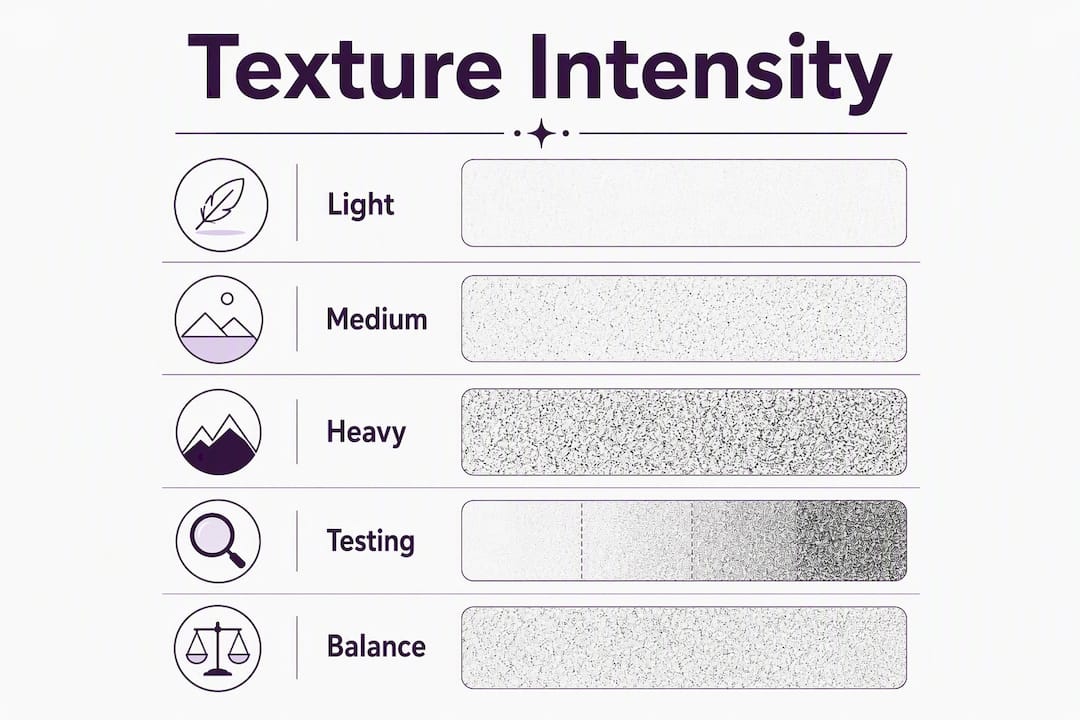
In practice: a light-texture film feels close to writing on a smooth notebook cover. A heavy-texture film feels closer to cartridge paper. The difference is obvious within the first ten minutes of use, and it is not something you can judge from a product photo.
The optical effect is worth understanding. Heavier grain scatters more light, which reduces micro-contrast and makes fine lines in reference images look slightly fuzzy. For note-taking this is irrelevant. For detailed illustration or colour grading, it can be genuinely distracting. Anti-reflective matte films with higher transparency preserve more micro-contrast than heavy-textured films; discerning illustrators often prefer high-transparency AR matte films to maintain colour accuracy.
Pro Tip: Before committing to a heavy-texture film, test the friction level by drawing on a sheet of the actual paper you prefer. If 80gsm cartridge paper feels right, aim for medium grain. If you want more resistance, go heavier. This gives you a physical reference point rather than relying on vague “paper-feel” marketing copy.
For note-takers, medium grain is usually the sweet spot: enough resistance to stop the stylus drifting, not so much that writing feels laboured. For illustrators doing detailed linework, the choice between heavy-grain film and medium-grain glass comes down to whether tip wear or colour accuracy is the bigger concern.
How do you pick the right alternative?
Start with your dominant task, then work down: task → texture level → installation preference → budget.
- Identify your bottleneck. Line control problems (stylus sliding, imprecise strokes) point to matte film. Colour or contrast complaints point to glass or removable sheets.
- Choose texture intensity. Light for speed and clarity; heavy for maximum friction and paper feel; medium for most users.
- Decide on installation type. If you are not confident with adhesive films, start with a magnetic or removable sheet. If you want permanent drop protection, go tempered glass.
- Set a budget. Budget matte films start under £10. Mid-range branded films and matte glass sit in the £15–£30 range. Premium options exceed £30.
Decision checklist before you buy:
- What is my dominant task: note-taking, illustration, colour work, or mixed?
- How much clarity loss can I tolerate?
- Am I prepared to replace stylus tips more frequently with heavy texture?
- Do I want to remove the protector for media consumption?
- Is there a model-specific variant for my exact device?
Red flags to avoid: no returns policy, “fits all tablets” claims with no model cut-out, no mention of texture grade, and no spare film in the pack. Check the screen protector types guide for a fuller breakdown of what each category actually protects against.
What should UK buyers check before ordering?
Installation quality determines whether a film is usable. A single dust particle trapped under an adhesive film creates a permanent bubble; a misaligned cut leaves an exposed edge. The texture choice matters far less than a clean install.
Practical installation steps:
- Work in a low-dust room, ideally after a shower (steam settles airborne particles)
- Use the dust-removal stickers included in most kits before laying the film
- Align the cut-out to camera and speaker holes before peeling the backing
- Use a card or squeegee to push air from the centre outward
- For tempered glass, use the alignment frame if one is included
Pro Tip: For single-use adhesive films, do a dry run first. Hold the film over the screen without removing the backing, check the alignment against every cut-out, then peel and apply in one confident motion. Hesitating mid-apply causes bubbles.
For returns, UK buyers should expect: a minimum 14-day return window (your statutory right under the Consumer Contracts Regulations), a spare film in the box for re-tries, or a magnetic/removable option if you want to test textures without risk. Check whether the seller lists model-specific variants. A film listed for “iPad 11-inch” without specifying the generation is a warning sign. Retailers with clear film return policies and model-specific listings reduce the chance of a wasted purchase.
Which alternatives are worth buying in the UK?
Entry-level matte film suits note-takers who want reduced glare and basic stylus grip without spending much. Quality varies, so look for packs that include at least two films and have verified reviews describing the texture in detail. Best for: Apple Pencil and Samsung S Pen users doing handwritten notes.
Medium-grain branded matte film is the closest match to the Paperlike experience for most illustrators. The texture is consistent, clarity loss is moderate, and the pack usually includes a spare. Matte film is generally better for line control; tempered glass wins on clarity and scratch resistance. Best for: daily drawing on iPad Pro or Samsung Galaxy Tab S series.
Removable magnetic sheet is the pick for anyone who cannot decide between texture and clarity. You get both, just not simultaneously. Check compatibility carefully; not all devices have a magnetic edge that works with these products.
Matte-coated tempered glass is the right call for colour-critical work or users who drop their tablets regularly. The HD tempered glass options from SmartProtectors cover iPad Pro 11 and 12.9, with model-specific fit and UK shipping. SmartProtectors also stocks options for Huawei MatePad, Honor MagicPad, and a range of other tablets, with a sourcing request service for less common models.
What should you buy first?
For most readers, a medium-grain matte film is the right first purchase. It costs less than tempered glass, delivers the friction improvement most note-takers and illustrators are actually after, and is easy to replace if the texture level is wrong. If colour accuracy is your priority, go straight to matte-coated tempered glass.
Buy from a seller with a clear returns policy and model-specific listings. Texture preference is personal enough that a trial is worth more than any review.
Key takeaways
Matte film suits line control; tempered glass suits clarity and drop protection. Choose by your dominant bottleneck, not by price alone.
| Point | Details |
|---|---|
| Choose by bottleneck | Line control problems call for matte film; colour or clarity concerns call for glass or removable sheets. |
| Texture vs clarity trade-off | Heavy texture improves stroke stopping but softens the display; light texture preserves more colour accuracy. |
| Tip wear with heavy texture | Daily drawing on heavy-grain film accelerates stylus tip wear; inspect tips weekly and budget for replacements. |
| Installation and returns | Demand a model-specific cut-out, a spare film in the pack, and a clear returns window before ordering. |
| SmartProtectors availability | SmartProtectors stocks model-specific matte and tempered glass options for UK buyers, with a sourcing service for unlisted devices. |
A note on choosing well
Picking a matte film or textured glass protector sounds straightforward until you realise how much the texture level changes the experience. The guides and comparisons compiled here point consistently to one conclusion: no single texture works for every workflow. The readers who end up satisfied are the ones who matched their choice to a specific bottleneck rather than buying the most popular option.
SmartProtectors’ product range and blog resources are maintained to reflect current model availability and buying guidance. The iPad screen protector guide for drawing is updated for 2026 and covers the most common tablet models in detail.
SmartProtectors: model-specific options for UK buyers
If you have read this far and know which category you want, SmartProtectors makes the next step straightforward.
SmartProtectors supplies screen protectors, tempered glass, and protective cases for a wide range of tablets and smartphones, with model-specific listings that take the guesswork out of fit. UK shipping, clear returns, and a sourcing request service for devices not yet in the catalogue. If your tablet model is not listed, submit a request and it will be added.
Browse the full range and check model availability at SmartProtectors.
Useful sources
- Paperlike vs tempered glass for iPad drawing (Clumsy Cursor) — core comparison of matte film vs glass for drawing workflows; the buy-by-bottleneck framework comes from here.
- Best paperlike screen protectors for Android tablets (AndroidPad) — covers branded matte film options, packaging expectations, and tip-wear notes for daily drawing.
- Paperlike vs PenMat (Pen.Tips) — explains the removable magnetic sheet approach and when it outperforms permanent adhesive films.
- Best alternatives to Paperlike screen protectors (Acciyo) — broad overview of matte film, matte tempered glass, and budget options with texture and clarity notes.
- Screen protector types guide (SmartProtectors) — explains protector categories and selection criteria for UK buyers.
This article is general buying guidance, not professional advice. Check current return policies and model compatibility directly with the retailer before purchasing.