

Fit comes first, protection level second, easy cleaning third. Confirm the tablet’s exact model or A-number before you look at a single case, because a case that suits the wrong generation of iPad or Fire tablet will sit loose at the corners exactly where drops happen. Once fit is locked in, match the protection grade to your child’s age and routine, then check the material wipes clean without fuss.
TL;DR:
- Confirm the exact model number or A-number before purchasing to ensure a proper fit, especially since screen size alone is unreliable.
- Prioritize cases with raised bezels and reinforced corners for effective impact absorption during drops, especially at edges and corners.
- Use high-density silicone or thick EVA foam cases for long-term durability and easier disinfection, while thinner TPU or polycarbonate are better suited for older children needing slimmer options.
- Match the protection level to your child’s routine, choosing slim sleeves for home use, reinforced folios for mixed environments, or rugged shells for travel and toddlers.
- Verify that all cutouts, button presses, and accessory access points align precisely with the product images to prevent issues after purchase.
Table of Contents
- What features actually matter in a kids tablet case guide?
- Which materials last, and which are easiest to clean?
- How do you confirm the case will actually fit?
- Matching protection to your child’s routine
- Which kid-friendly features are worth paying for?
- How do you choose and buy the right case today?
- How SmartProtectors matches these criteria to real products
- What do families keep getting wrong about kids’ tablet cases?
- Sources
What features actually matter in a kids tablet case guide?
Not every feature on a product listing earns its price tag. Some genuinely stop screens cracking; others are marketing gloss.
Raised bezels and reinforced corners do the real work. Most drops land on a corner or an edge, so a case with a bezel that sits a few millimetres above the glass, combined with thicker foam or silicone at the corners, absorbs the impact that would otherwise travel straight into the screen. A flat-fronted case with no lip offers almost nothing here.
Fit matters just as much as material. A one-piece case that wraps snugly round the tablet body holds it far more securely than a two-part shell that clips together, because clip seams are exactly where a determined toddler finds a way to prise the tablet loose mid-drop.
Built-in screen protectors are tempting because they save you a separate purchase, but they’re inconsistent. Testers reviewing kids’ tablet covers found some integrated protectors that reduce touch sensitivity or trap air bubbles at the edges, and cheaper models can be fiddly to fit correctly out of the box. A separately applied tempered-glass screen protector usually gives a cleaner result than a bundled film of unknown quality.
Before you buy, check these details against the actual product photos, not just the description:
- Camera cutouts line up precisely, front and rear, with no overlap onto the lens.
- Charging ports stay accessible without needing to peel back foam or unclip a flap.
- Stylus storage or charging is preserved if the tablet uses one (this trips up a surprising number of budget cases).
- Button covers actually register a press rather than needing extra force.
- Speaker grilles aren’t muffled by thick material sitting directly over them.
When a listing claims “drop tested” or “military grade,” ask what standard it’s tested against. Genuine shock-absorbent claims usually reference a specific drop height or a recognised test method; vague wording with no numbers attached is usually just copywriting.
Which materials last, and which are easiest to clean?
Material choice decides how long a case survives sticky fingers, dropped juice, and being sat on in the back seat of a car.
High-density silicone and thick EVA foam are the standouts for family use. They flex on impact instead of transferring the shock straight to the tablet, and reviewers have found these materials tolerate sanitising wipes and even light dishwashing better than fabric alternatives. If you’re buying one case to survive years of use, this is the material pairing to look for.
TPU and polycarbonate shells suit older children who need something slimmer for a school bag rather than maximum drop protection. They’re durable for everyday knocks, but check the corners specifically. Many TPU cases are uniform thickness all round, which means the weakest point (the corner) gets no extra reinforcement at all.
Fabric and leather-look cases look smart in product photos, but they’re the wrong choice for a child under ten. Fabric weave holds crumbs, dust and germs in a way silicone simply doesn’t, and you can’t disinfect it properly without risking the stitching or the lining. “Easy-clean” on a listing usually means “wipe with a damp cloth,” not “safe to blast with antibacterial spray.” When in doubt, a quick wipe with a mild soap solution on silicone or EVA is the safest general approach across most cases.
How do you confirm the case will actually fit?
Screen size in inches is the least reliable number on a product page. Two tablets with an identical 10.9 inch screen can have completely different body widths, port placements and camera housings, so matching by model or generation beats matching by screen size every time.
- Find the exact model number. Check the settings menu, or look for the stamped model number on the back of the tablet, then cross-check it against the manufacturer’s generation-specific diagrams if you’re at all unsure. For iPads specifically, matching the A-number before you buy avoids the single most common return reason.
- Measure the body if the listing is vague. Width, height and thickness in millimetres, not just the screen diagonal.
- Study the cutout photos closely. Cameras, ports, speakers and buttons should all line up in the product images, not just be mentioned in the text.
- Check screen protector clearance. If the case bezel wraps over the glass edge, confirm it won’t lift the corners of any screen protector you plan to fit.
Matching protection to your child’s routine
There’s no single “best” case, because a toddler’s playroom tablet and a teenager’s school tablet face completely different risks. Buying the bulkiest, most rugged option available isn’t always the smart move; it’s often overkill for a 12 year old who just wants something that fits in a backpack pocket.
Three broad tiers cover most families. A slim sleeve or folio suits desk-based or supervised use, where the tablet mostly sits on a table and drop risk is low. A reinforced folio with padded corners handles mixed use, where the tablet moves between rooms, cars and school bags but isn’t being thrown around. A rugged EVA foam shell with a handle is built for toddlers and travel, where drops from height and repeated knocks are the norm rather than the exception.

Editors covering tablet accessories consistently recommend matching the protection tier to the actual use-case rather than defaulting to the heaviest option on the shelf. A five year old handed a tablet for the car journey needs the rugged tier; a nine year old using one at the kitchen table for homework rarely does.
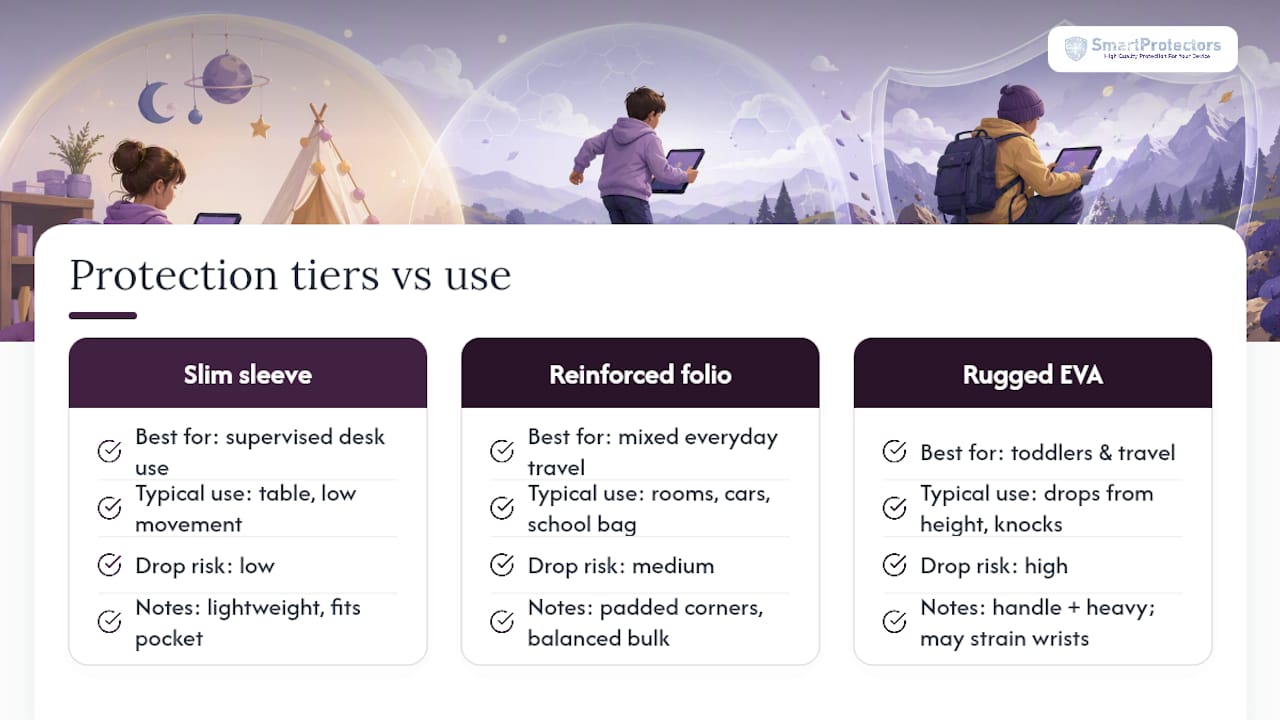
Pro Tip: Weight matters more than parents expect. A thick EVA shell can add real bulk to an already heavy tablet, and for younger children holding it up during long viewing sessions, that extra weight causes wrist strain faster than the case’s protection rating would suggest. If your child watches shows for 30 minutes or more at a time, prioritise a stand over raw bulk.
Which kid-friendly features are worth paying for?
Handles, stands and grips get marketed heavily, but not all of them earn their space on the box.
A built-in handle is genuinely useful for children who carry the tablet themselves, provided it’s moulded into the case rather than a separate strap. Loose shoulder straps and detachable handles look practical but can add dangerous leverage, as a strap catching on furniture while a child is holding the tablet is a real, if uncommon, injury risk that a fixed grip doesn’t carry.
Stands are worth having if they’re non-detachable and genuinely stable on a flat surface. A wobbly kickstand that folds under light pressure is worse than no stand at all, since it invites the tablet to topple mid-video. A simple, fixed kickstand generally serves children better than a magnetic or removable one that can be lost or misaligned.
A few checks before buying:
- Avoid cases with small removable parts (caps, plugs, stylus holders) that a toddler could pull off.
- Test whether button covers register a firm press, not a mushy half-press.
- If there’s a strap, check the attachment points are stitched or moulded, not just glued.
- Stands should hold the tablet at a stable angle without sliding, even on a slightly uneven surface.
Cutting screen time occasionally helps too, and a stable stand makes short supervised sessions easier to manage if you’re looking for screen-free activities to balance things out.
How do you choose and buy the right case today?
Work through this in order rather than jumping straight to the “cutest” case in a listing.
- Confirm the model or A-number using settings or the stamped number on the tablet back.
- Identify the dominant setting: home, school, or travel, since this decides the protection tier you need.
- Pick the protection tier: slim folio, reinforced folio, or rugged EVA shell.
- Check fit and accessory access against the product photos, camera cutouts included.
- Validate cleaning claims, favouring silicone or EVA if you need to disinfect regularly.
- Ask the seller directly if a listing doesn’t specify the exact model compatibility.
Before you check out, run through this shortlist:
- Does the listing name the exact model, not just a screen size?
- Are there recent buyer photos showing the fit in real use?
- Is the return policy clear if the case doesn’t fit?
- Does the seller offer support if your model isn’t listed?
Replace a case once you spot cracked corners, a stand that no longer locks, or a screen protector edge that’s lifting; any of these signal the case has stopped doing its job.
How SmartProtectors matches these criteria to real products
Everything above points to the same three questions: does it fit, does it protect enough for the routine, and can you keep it clean? The catalogue is built around answering those questions directly rather than making you guess from a photo.

For children who carry their tablet between rooms or into a school bag, the Rabbit Flat Tri-Fold Protective Case folds flat for storage without adding unnecessary bulk. If your existing case includes a poor-quality built-in film, or none at all, SmartProtectors’ screen protector range covers separately applied tempered-glass options for older, scratch-prone tablets and phones, including the 3-Pack full coverage shockproof tempered glass with installation tool for households juggling more than one device. Not sure which A-number your iPad actually is? The iPad compatibility guide walks through it in a couple of minutes, and if your exact tablet or phone model isn’t listed in the catalogue, you can submit a request and it will be sourced where possible. Start by checking your device’s model page, then order with the fit already confirmed.
What do families keep getting wrong about kids’ tablet cases?
Customer messages coming into SmartProtectors follow a pattern, and it’s rarely about the case itself. It’s the model number. Parents order by screen size, assuming a 10.9 inch label means any 10.9 inch case will do, and then find the camera cutout sits half a centimetre out of place or the case gapes at one corner.
The second recurring mistake is cleaning. Fabric-covered cases get bought because they look nice in photos, then six months later a parent is trying to scrub jam out of the weave with something far too harsh, when a silicone case would have wiped clean in seconds.
What actually helps is spending two minutes finding the exact model before opening any product page. The support team fields A-number questions regularly, and special-order sourcing exists to address requests for unlisted tablet models.
— Dian
Sources
- Best kids’ iPad and tablet cases, tested and reviewed
- How to Choose a Tablet Case for Your Tablet Size
- Best iPad cases for kids (ZDNet review and notes on cleaning)
- Tablet cases: What to look for when buying tablet cases