

Wireless charging works through most phone cases without any issue. The short answer: if your case is thin, non-metallic, and correctly positioned on the charger, you can leave it on. The Qi standard, which underpins virtually every Android wireless charger on the market, is designed to work across small air gaps. MagSafe on iPhones and the newer Qi2 standard add magnetic alignment rings that make the process even more dependable through a case. Three things determine whether yours will work:
- Material: silicone, TPU, plastic, leather, and fabric all pass the magnetic field through. Metal blocks or severely disrupts it.
- Thickness: slim cases under roughly 3–5 mm give the best results; most chargers struggle above 6–7 mm.
- Alignment and magnets: for MagSafe and Qi2, the case must carry a correctly placed magnet array. A misaligned or missing ring causes intermittent charging even through a thin case.
Key takeaways
Wireless charging works through most non-metallic cases under 5 mm thick; material, thickness, and coil alignment are the three variables that determine whether yours will charge reliably.
| Point | Details |
|---|---|
| Material is the first filter | Silicone, TPU, plastic, and leather pass the magnetic field; metal blocks it. |
| Thickness threshold | Aim for under 5 mm; most chargers struggle above 6–7 mm with reduced efficiency. |
| Magnets change the rules | MagSafe and Qi2 cases need a correctly placed, unobstructed magnet ring for reliable alignment. |
| Heat is the hidden risk | Thick or misaligned cases trap heat and trigger charging throttle; remove the case if the phone gets hot. |
| SmartProtectors | Slim TPU and PC cases from SmartProtectors are selected to stay within Qi-compatible thickness ranges. |
Table of Contents
- How does wireless charging actually work through a case?
- Which case materials let wireless charging through?
- How thick is too thick for wireless charging?
- Do MagSafe and Qi2 make charging through a case more reliable?
- Can you charge wirelessly through a metal case?
- How do cases affect charging speed and battery temperature?
- Practical checklist: how to get reliable wireless charging with a case on
- Simple at-home tests to check whether your case is the problem
- Why checking case specs and testing matters more than you might think
- SmartProtectors cases that work well with wireless charging
- Sources
How does wireless charging actually work through a case?
The transmitter coil inside your charging pad generates an alternating magnetic field. The receiver coil inside your phone picks that field up and converts it into electrical current. Your case sits in the gap between those two coils, and as long as it does not block the magnetic field, charging proceeds normally.
Two variables matter most in practice: distance and lateral alignment. A thicker case increases the air gap, which weakens the coupling between coils and forces the charger to work harder. Drift the phone sideways off-centre and the coils no longer overlap properly, which can halt charging entirely.
The Qi standard was built with this gap in mind, so a thin case rarely causes a problem. MagSafe and Qi2 change the equation by adding a ring of magnets that snaps the phone into the correct position automatically. That precision is why a MagSafe charger tends to be more consistent through a case than a basic Qi pad.
Pro Tip: If your phone keeps stopping and restarting on a Qi pad, try sliding it around the charger surface in small increments. You will often feel or hear a click as the coils align, and charging will stabilise.
Which case materials let wireless charging through?
Thin, non-metallic cases generally allow wireless charging without removal; the material itself rarely causes a problem unless it contains metal components. Here is how common materials behave:
- Silicone and TPU: fully transparent to the magnetic field. These are the safest choices for wireless charging and the most common slim-case materials.
- Hard plastic (polycarbonate): works well. Most clear and frosted cases fall into this category.
- Leather and faux leather: compatible in most cases, though thicker leather folios can add enough bulk to slow charging.
- Fabric: compatible, provided there are no metal threads or embedded accessories.
- Carbon fibre: this is where it gets complicated. Pure carbon fibre is non-metallic and technically compatible, but many carbon-fibre cases use a resin-and-fibre weave that can induce eddy currents and interfere with charging. Results vary by product.
- Metal: blocks or severely disrupts inductive charging. A fully metal case is effectively incompatible with standard Qi charging.
The material is only part of the story. Design features matter just as much:
- Wallet cases with cards: bank cards and ID cards contain metallic strips or RFID chips that can interfere with charging. Wallet-style cases often require removal for reliable charging.
- Battery cases: the internal battery circuitry typically blocks wireless charging entirely.
- Adhesive metal rings and kickstands: popular pop-socket-style rings and fold-out stands often contain enough metal to disrupt alignment.
- Built-in card pockets on the back: even a single card tucked behind the phone can cause intermittent charging.
A case labelled “wireless charging compatible” by its manufacturer is a useful signal, but not a guarantee. Real-world testing with your specific charger is always the definitive check.
How thick is too thick for wireless charging?
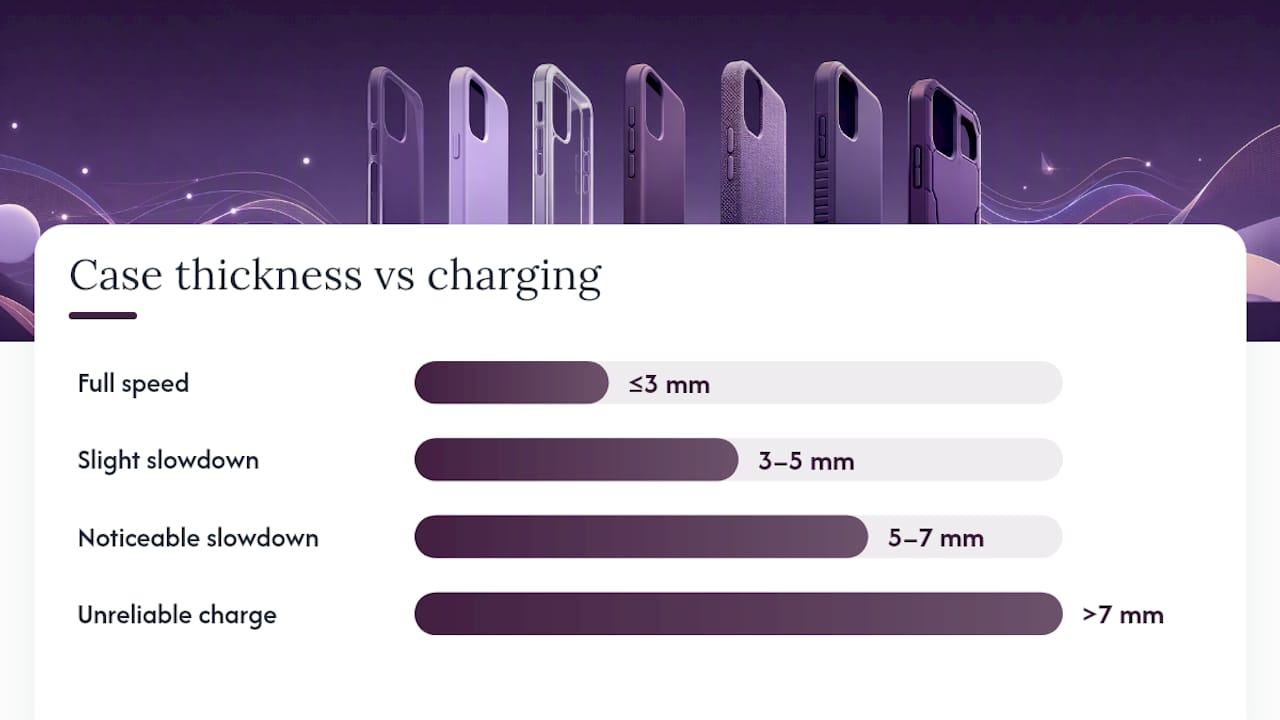
The practical answer: aim for a case under 5 mm for reliable everyday charging, and treat anything above 7 mm as likely to cause problems.
Thickness matters because every extra millimetre of case increases the air gap between the transmitter and receiver coils. A wider gap means weaker magnetic coupling, which forces the charger to compensate by running hotter and longer. Consumer guidance consistently points to the same thresholds: slim cases under roughly 3 mm work without any perceptible penalty; most chargers tolerate up to around 6–7 mm but with reduced efficiency and increased heat.
At a glance: cases under 3 mm: full speed, minimal heat. 3–5 mm: slight slowdown, usually acceptable. 5–7 mm: noticeably slower, charger runs warmer. Above 7 mm: unreliable or no charge on most standard pads.
Beyond raw thickness, watch for these design issues:
- Multi-layered backs: a hard shell over a soft inner liner can add 2–3 mm you would not notice by feel alone.
- Raised camera surrounds: if the camera bump sits directly over the charging coil area, the effective gap at the coil location can be greater than the case’s nominal thickness.
- Internal cavities: some rugged cases have air pockets for shock absorption that increase the effective gap without adding visible bulk.
- Adhesive accessories: a stuck-on card holder or decorative plate on the back adds thickness and, if metallic, interference.
Specialised chargers marketed as compatible with cases up to 10 mm do exist, but results vary considerably between devices and chargers. Treat such claims with scepticism and test before relying on them.
Do MagSafe and Qi2 make charging through a case more reliable?
Yes, significantly, but only when the case itself is built for it. MagSafe (Apple’s proprietary magnetic charging standard for iPhone 12 and later) and Qi2 (the open standard that brings the same magnet-ring approach to Android) both embed a ring of magnets in the charger. When the case carries a matching magnet array, the phone snaps into perfect alignment every time.
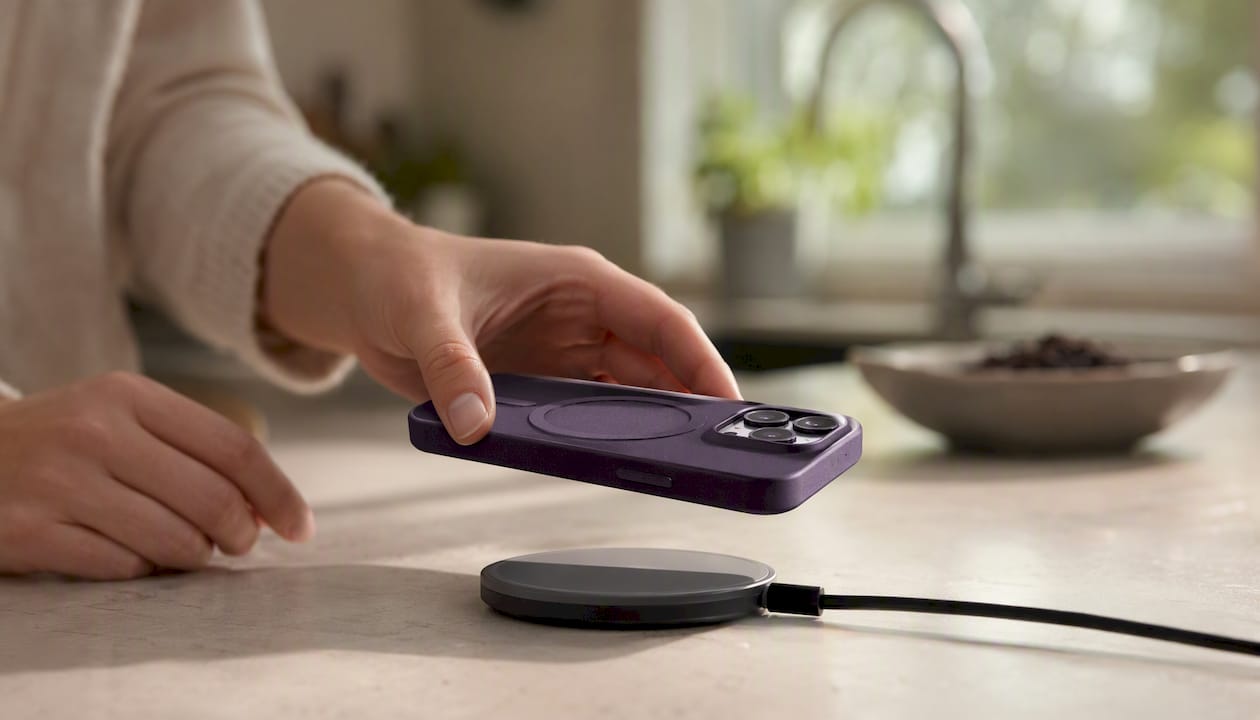
The catch is that the case must meet two conditions. First, the magnet ring must be precisely positioned to match the phone’s internal coil. Second, it must be unobstructed. A case with a poorly placed or weak magnet array, or one where the ring has shifted inside the case body, will cause the phone to drift off-centre mid-charge. Modern magnetic standards require a correctly placed, unobstructed magnet array and a thin case to make alignment dependable; without that, charging becomes intermittent.
For older phones without built-in magnets, a MagSafe or Qi2-compatible case can add that capability entirely. The case supplies the magnet ring the phone lacks. This works well when the ring is stable, but combined accessories such as kickstands or grip rings can loosen over time and break alignment. Once that alignment shifts, charging stops reliably.
- Passive thin cases (no magnets): work on Qi pads; need manual centring on MagSafe/Qi2.
- Cases with a built-in magnet ring: snap into alignment on MagSafe/Qi2 chargers automatically.
- Cases with added accessories (kickstands, grips): risk losing alignment as the accessory wears.
For MagSafe-compatible case options matched to specific iPhone models, the SmartProtectors MagSafe cases guide is a practical starting point.
Pro Tip: Before buying a case marketed as MagSafe-compatible, check whether the magnet ring is integrated into the case body or simply glued on. Integrated rings hold their position far better over months of daily use.
Can you charge wirelessly through a metal case?
Not with a standard Qi charger. Metal in the charging path induces eddy currents, which dissipate the magnetic field as heat rather than letting it reach the phone’s receiver coil. The result is either no charging at all or a very hot charger with minimal power delivery.
Engineering workarounds do exist, but they are research-grade solutions rather than consumer products. A three-coil relay system demonstrated in prototype work converts the metal cover itself into a relay coil, achieving around 5 W output with roughly 71% coil-to-coil efficiency in lab conditions. Separately, IEEE research using resonator designs and segmented metal housings measured up to 8.7 W delivered to a smartphone battery at peak coupling positions. Qualcomm announced resonant techniques capable of tolerating metal near the charge field, demonstrating that the engineering path exists. None of these approaches translates into a simple aftermarket case fix.
The practical reality: if your case is metal, remove it to charge. If you want the look of metal with wireless charging, look for cases that use insulated metal strips or a metal-effect finish over a non-metallic substrate. These are designed to pass the magnetic field through while giving the appearance of aluminium or steel.
What not to do:
- Do not cut slots or holes in a metal case hoping to create a charging window. This can damage the case, expose the phone, and still fail to enable charging.
- Do not place a metal case on a wireless charger and leave it unattended. The eddy-current heating can make the charger and case uncomfortably hot.
- Do not assume a “metal-look” case is actually metallic. Many are polycarbonate with a metallic coating and charge without issue.
How do cases affect charging speed and battery temperature?
Cases slow wireless charging and trap heat. Both effects are worth understanding, because heat is the single biggest enemy of long-term battery health.
Reduced coil coupling from a thicker or misaligned case means the charger takes longer to deliver the same amount of energy. On a fast wireless charger, a slim silicone case might add only a few minutes to a full charge.
The heat problem compounds this. Wireless charging already generates more heat than wired charging. A case that traps that heat against the phone’s back raises the battery temperature further. Most phones throttle charging speed automatically when they detect high temperatures, which can create a frustrating cycle: the phone charges slowly, gets warm, throttles further, charges even more slowly.
Signs that heat or alignment is causing problems:
- The phone repeatedly stops and restarts charging during the night.
- The back of the phone feels hot to the touch within a few minutes of placing it on the pad.
- The charger’s LED flashes or shows an error state.
- The phone’s battery percentage barely moves over 30 minutes.
If the phone feels uncomfortably hot, remove it from the charger and let it cool before continuing. Avoid charging under a pillow or in a case that visibly deforms from heat. Leather cases, in particular, can trap heat more than silicone or TPU because they are less breathable.
Practical checklist: how to get reliable wireless charging with a case on
Follow these steps in order and most case-related charging problems resolve themselves.
- Choose the right case material. Silicone, TPU, and polycarbonate are the safest choices. Avoid metal, and check for hidden metal components in wallet cases or rugged designs.
- Check case thickness. Aim for under 5 mm. If the case is thicker, use a charger with a higher output rating, or accept slower charging.
- Use a charger with adequate output. A 10 W or 15 W Qi pad gives more headroom to compensate for a thicker case than a basic 5 W pad.
- Centre the phone carefully. On a standard Qi pad, place the phone’s camera area roughly over the charger’s centre. On a MagSafe or Qi2 pad, let the magnets do the work.
- Remove cards, rings, and metal accessories from the back. Even a single bank card in a back pocket can disrupt charging.
- Keep surfaces clean. Dust and debris between the case and charger reduce contact and can cause misalignment.
- Inspect magnet rings periodically. On MagSafe-compatible cases, check that the ring has not shifted or weakened. A loose ring is a common cause of intermittent charging.
- Know when to remove the case. If charging is consistently slow, the phone overheats, or the charger shows errors, remove the case and charge directly. A wallet case with card slots should always be emptied of cards before wireless charging.
Pro Tip: SmartProtectors cases are selected with wireless charging compatibility in mind. Slim TPU and PC options in the range are designed to stay under the thickness thresholds that cause problems on standard Qi pads, so you rarely need to choose between protection and convenience.
Simple at-home tests to check whether your case is the problem
A few quick checks will tell you whether your case is causing the issue or whether the problem lies elsewhere.
- Clean both surfaces. Wipe the charger pad and the back of the case with a dry cloth. Dust and grime can prevent proper contact and cause misalignment.
- Try without the case. Place the phone directly on the charger. If it charges normally, the case is the variable to investigate.
- Try a different charger. A higher-output pad may cope with a thicker case where a basic one cannot. If a second charger works and the first does not, the original charger’s output is the limiting factor.
- Monitor the charge rate. Use your phone’s battery settings or a battery widget app to watch the percentage rise over 10 minutes. Under 1% per minute on a 10 W charger suggests poor coupling.
- Feel for heat. After five minutes on the pad, touch the back of the phone. Warmth is normal; hot enough to be uncomfortable suggests the case is trapping heat or the coils are misaligned.
- Reposition the phone. Slide it around the pad surface slowly. If charging starts or speeds up at a particular position, alignment is the issue, not the case material.
If the phone charges reliably without the case but not with it, and repositioning does not help, the case is either too thick, contains a metal component, or has a magnet ring that is out of position. Persistent instability after all these steps points to a faulty charger or a case that is simply not compatible with your specific phone and charger combination.
Pro Tip: Rather than relying solely on the charger’s LED indicator, check your phone’s lock screen or notification bar. Most phones display a charging icon and, on many models, the current wattage. That number is far more informative than a single LED light.
Why checking case specs and testing matters more than you might think
The assumption most people make is that any case labelled “wireless charging compatible” will work with any Qi charger. In practice, that label tells you the case material does not block the field. It says nothing about thickness, magnet placement, or how the case performs with a specific charger at a specific wattage.
Manufacturer claims are a useful starting point, not a guarantee. The combination of your phone model, your charger’s output, and your case’s exact construction determines the real-world result. A case that works perfectly on one person’s 15 W Qi2 pad might charge sluggishly on another person’s 5 W travel charger.
At SmartProtectors, we source cases with wireless charging compatibility as a practical consideration, not an afterthought. Where possible, we check that slim TPU and polycarbonate options stay within the thickness ranges that work reliably on standard Qi pads. If you are unsure whether a specific case will work with your phone and charger, get in touch and we will help you find the right match.
SmartProtectors cases that work well with wireless charging
Choosing a case that does not fight your charger is simpler than it sounds. SmartProtectors stocks slim TPU, polycarbonate, and PC-plus-leather options that sit comfortably within the thickness ranges where Qi charging works reliably, and several MagSafe-ready designs for iPhone users.
The range includes slim airbag-corner TPU cases that protect without adding bulk, PC and PU leather options for a premium feel, and drop-proof leather cases for everyday durability. Can’t find your model? Submit a request at SmartProtectors and we will source a compatible case for you, typically within days.
Sources
- What type of phone case is best for wireless charging?
- Can Wireless Charging Work With Case: Guide & Best Tips - Anker UK
- Qualcomm - Qualcomm Becomes First Company to Enable Wireless Charging for Mobile Devices with Metal Cases
- A three‑coil wireless charging system for full metal‑cover smartphone applications