

Tempered glass is the right call for most older phones, since it resists scratches better than film and keeps resale value intact. Measure your screen or search SmartProtectors’ catalogue by exact model, and if it’s not listed, submit a request rather than settling for a generic universal sheet that will lift within weeks.
TL;DR:
- Tempered glass provides the best all-round protection for older phones, resisting scratches and light impacts while preserving resale value.
- Custom-fit, laser-cut protectors are essential for older or discontinued models to ensure precise coverage and prevent lifting or dust ingress.
- Ensure the protector properly covers the screen dimensions, especially for curved edges and cutouts, by measuring twice and choosing model-specific options.
- Replacing a worn or damaged protector is necessary, as layered or improperly fitted sheets can trap dust, reduce sensitivity, and diminish clarity over time.
- Combining a tempered glass protector with a case that has a raised lip offers the best overall impact and scratch defense, especially for phones with already compromised screens.
Table of Contents
- What’s the best screen protector for an old phone?
- How do you check screen protector fit for an old model?
- Signs you need to replace your screen protector
- How to install a screen protector on an older phone
- Should you use a case instead of a protector?
- Where to buy screen protectors for older or uncommon phone models
- Why older screens cause compatibility headaches
- What should you budget for a protector on an old phone?
- Why the “just buy any protector” advice fails older phones
- Order the right protector for your exact model
- Sources
- FAQ
What’s the best screen protector for an old phone?
Four materials dominate the market, and they behave very differently once you strip away the marketing language. PET (polyethylene terephthalate) is the thinnest and cheapest option, a basic plastic film that blunts light scuffs but does little against a proper scratch. TPU (thermoplastic polyurethane) is flexible, wraps around curved edges, and often carries some self-healing coating that shrugs off hairline marks over a few hours. Tempered glass is chemically hardened glass, usually sitting around 7 to 8 on the Mohs hardness scale, and it’s the closest match to the feel of the original screen while offering the strongest resistance to both scratches and light impacts, according to PCMag’s breakdown of protector types. Liquid or nano coatings sit at the bottom of the list for a reason: they’re invisible and provide very limited hardness increase, so they are rarely recommended unless you specifically want an unbroken view with zero material on the glass.
Here’s how the four options stack up for an older device:
- Tempered glass — best all-round choice; protects resale value and absorbs light knocks, not just scratches.
- PET film — cheapest and thinnest; fine for casual use but offers minimal scratch defence.
- TPU film — flexible and good on curved or oddly shaped older displays; some self-healing benefit.
- Liquid/nano coating — invisible but weak; skip unless glass feels wrong to you.
Beware of “9H” ratings splashed across packaging. That figure often uses a different scale entirely from the Mohs system, and the pencil hardness test manufacturers rely on internally doesn’t always translate cleanly to consumer-facing numbers. Treat “9H” as a rough sales pitch, not a lab-verified promise. For an older phone you intend to keep for years, tempered glass wins on durability and resale protection; PET or TPU only makes sense if you want near-invisibility or your device has a curved edge that glass struggles to hug.
How do you check screen protector fit for an old model?
Older and discontinued phones rarely get the universal-fit treatment that flagship devices enjoy, so the fit-checking process matters more here than on a current iPhone or Samsung.
- Measure the screen twice — corner to corner diagonally, then straight across the visible glass, ignoring the bezel.
- Note every cutout — camera notch, speaker grille, fingerprint sensor position, and any curved edge that tapers into the frame.
- Choose laser-cut or custom-fit over generic die-cut sheets. Laser-cut edges are smoother and sit flush, which matters enormously on older frames where the glass-to-bezel gap is often inconsistent.
- Search a specialist catalogue by exact model number, not just the phone’s marketing name, since minor hardware revisions (a “Pro” variant, a regional SKU) change the cutout layout.
- If the model isn’t listed, submit a request. SmartProtectors’ screen protectors collection covers a wide catalogue of models, and unlisted devices can be added through a direct request rather than forcing you to buy a mismatched sheet.
- Check the return policy before buying, particularly on marketplace listings where “universal fit” often means “fits nothing precisely.”
Pro Tip: Take a photo of your phone next to a ruler and compare it against the product photos before ordering. A protector that’s even 1mm short on one edge will show a visible gap that collects dust and grime within days.
Signs you need to replace your screen protector
A worn protector rarely fails all at once. It degrades in stages, and each stage has a distinct tell.
- Visible scratches that catch the light at an angle, even if you can’t feel them with a fingernail.
- Yellowing, especially at the edges, common in older PET films exposed to UV light or heat.
- Bubbling or peeling edges, which trap dust and eventually spread across the whole surface.
- Reduced touch sensitivity, where taps register late or not at all, particularly with older resistive-adjacent panels.
- Smudge build-up that won’t wipe clean, a sign the oleophobic coating has worn through.
- Sensor interference, such as a proximity sensor that no longer dims the screen during calls.
The rule is simple: replace, don’t stack. Layering a new protector over an old one traps air and dust permanently, and it never improves clarity. If the screen underneath is actually cracked, a protector can hold loose shards in place and reduce further spreading, but it will not restore touch accuracy or repair the glass. Repeated protector failures within weeks of installation usually point to a genuine repair need, not a protector problem.
How to install a screen protector on an older phone
Installation on an older device is less forgiving than on a brand-new phone, mostly because years of pocket grit tend to work into the tiniest gaps around the frame.
- Clean thoroughly first. Use the supplied alcohol wipe, then the microfibre cloth, then let the screen air-dry for a minute before touching it again.
- Use the dust-removal sticker included in most kits to lift any remaining particles the wipe missed. Skipping this step is the single biggest cause of trapped bubbles.
- Align using the camera cutout and speaker grille as reference points, not just the edges, since older frames can have slightly uneven bezels.
- Lower slowly from one edge, letting the material settle under its own weight rather than dropping it flat.
- Push bubbles outward with a squeegee or a folded card, working from the centre toward the edges in overlapping strokes.
- For curved or recessed glass, apply gentle, even pressure along the curve first, since these areas are where TPU film typically outperforms rigid glass.
Pro Tip: A stubborn bubble that won’t budge after ten minutes usually has a dust particle underneath it. Lift that corner, remove the speck with tape, and reapply rather than pressing harder.
If edge lift appears after a few days rather than immediately, the adhesive likely wasn’t fully cured. A short, careful reheat with a hairdryer on low, followed by firm pressure along the affected edge, often resolves it. Persistent lifting on the same corner points to a poor die-cut match, and that’s when switching to a laser-cut or custom-fit protector, as covered in detail here, solves the problem for good.
Should you use a case instead of a protector?
A screen protector and a case solve different problems, and confusing the two leads to disappointment. A protector defends against surface scratches and light contact; it does very little in a genuine drop. A case with a raised lip around the screen edge gives meaningfully better drop protection than any protector alone, because it absorbs impact energy before the glass ever makes contact with the ground.
- Choose a case with a raised lip if you drop your phone often or use it one-handed near hard floors.
- Choose a repair, not another protector, if the glass underneath is already cracked or touch response has degraded.
- Combine both for genuine long-term value: a modest tempered glass protector plus a case with a lip costs far less than one cracked-screen repair.
For an older phone with real resale value or sentimental worth, weigh the maths honestly. A protector and case together typically cost a fraction of a screen replacement, so skipping the case to save a few pounds rarely pays off when the phone eventually meets a tiled floor.
Where to buy screen protectors for older or uncommon phone models
Mainstream electronics shops stock protectors for current flagships and little else, which leaves owners of a five-year-old handset with three realistic routes.
Specialist online retailers carry far deeper catalogues than a phone shop’s shelf, because there’s no physical rack space limiting how many models they can list. This is usually the fastest route to an exact match for an older device, since these sites organise stock by precise model number rather than by “recent releases.”

General online marketplaces can work in a pinch, but listings are often mislabelled or use vague “universal fit” language that doesn’t hold up once the parcel arrives. Cross-check the seller’s stated dimensions against your own measurements before ordering, and be wary of listings with no model-specific photos.
Request-based sourcing is the most reliable option when a phone is genuinely obscure, a regional variant, or simply old enough to have fallen off most catalogues. SmartProtectors accepts direct requests for devices not yet listed and adds them to the screen protectors collection once sourced, which matters far more for a decade-old handset than for something released this year.
Whichever route you choose, confirm the exact compatibility notes on the product page before paying. A model name alone isn’t enough; the internal revision often changes cutout placement by a few millimetres, and that’s the difference between a clean fit and a protector that lifts at one corner within a week.
Why older screens cause compatibility headaches
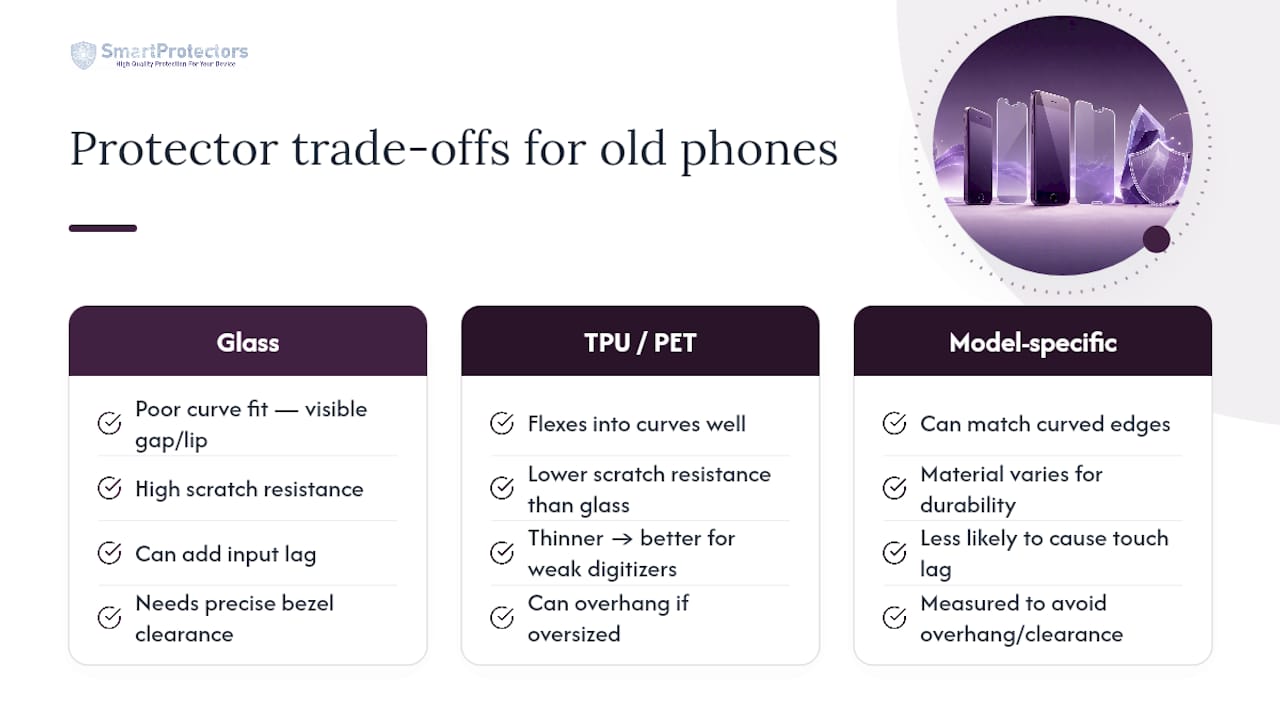
Older phones weren’t built to a single design standard, and that’s precisely where most fit complaints originate. Early curved-edge displays taper the glass toward the frame at an angle that flat tempered glass simply can’t follow, leaving a visible gap or a raised lip where the protector ends and the curve continues. TPU film handles this better because it flexes into the curve, even if it can’t match glass for scratch resistance.
Touch sensitivity is the other recurring issue. Some older panels, particularly budget and mid-range models from several years back, use less sensitive digitiser layers than current phones. A protector that’s even slightly thicker than the original can introduce a noticeable lag or require firmer presses to register. This is one reason thinner PET or TPU films sometimes outperform glass on older, lower-sensitivity screens, even though glass wins on durability.
Bezel design varies wildly across older models too. Some have a raised lip around the glass that a full-coverage protector must clear precisely; others have almost no bezel at all, meaning any protector larger than the visible glass will overhang and collect dirt. This is exactly why laser-cut or custom-fit protectors matter more for older, less standardised devices than for current phones built to more consistent specifications. A cheap universal sheet cut for “most 6-inch screens” is a guess. A model-specific laser-cut protector is measured to that phone’s actual dimensions.
What should you budget for a protector on an old phone?
Screen protectors for older models sit across a wide price band, and the difference usually comes down to material and precision of cut rather than brand prestige. Basic PET film sits at the lower end and suits a phone you’re using casually or plan to replace soon. Tempered glass costs more but delivers meaningfully better scratch and light-impact resistance, which matters more the longer you intend to keep the device.
Custom or laser-cut protectors for uncommon models sometimes carry a modest premium over mass-produced sheets for popular phones, simply because smaller production runs cost more per unit to manufacture. That premium is usually still far cheaper than a screen repair, so it’s rarely a reason to settle for a badly fitting universal option instead.
Multi-packs often work out better value than single units if you expect to replace the protector after scratches accumulate, since tempered glass does eventually need swapping even though it lasts considerably longer than film. Factor in shipping costs too, particularly for a specialist request order, since sourcing an uncommon model sometimes takes a little longer than grabbing a protector for a current flagship off a shelf. The value calculation isn’t really about the sticker price; it’s about cost per year of protection against a screen repair that costs many times more.
Why the “just buy any protector” advice fails older phones
Most protector advice online assumes you’re shopping for a current flagship with dozens of options on every shelf. That advice falls apart the moment you own something five or six years old, because the universal-fit sheets that work fine on a popular new release simply don’t account for the bezel quirks, curved edges, and non-standard cutouts that older, less mainstream models carry.
The overlooked variable is precision of cut, not material hype. A “9H” glass protector cut half a millimetre wrong for your exact model will lift at the corner within a fortnight, regardless of how hard the glass itself is rated. Laser-cut, model-specific sourcing solves a problem that no amount of marketing language on a generic sheet ever will. As someone who writes regularly about self-healing films and how they behave on older, curved displays, I’d argue the industry undersells this: fit precision protects a screen more reliably than headline hardness numbers ever do.
SmartProtectors’ catalogue depth, and its willingness to source protectors for models that have otherwise fallen off retailers’ radars, gives owners of older phones a practical route to that precision instead of a compromise. If your exact model isn’t listed, that’s a request worth submitting rather than a reason to grab whatever fits “close enough.”
— Dian
Order the right protector for your exact model
Specialist retailers provide catalogues built around exact model numbers, including phones that have long since disappeared from mainstream shelves, plus request services for anything still missing.
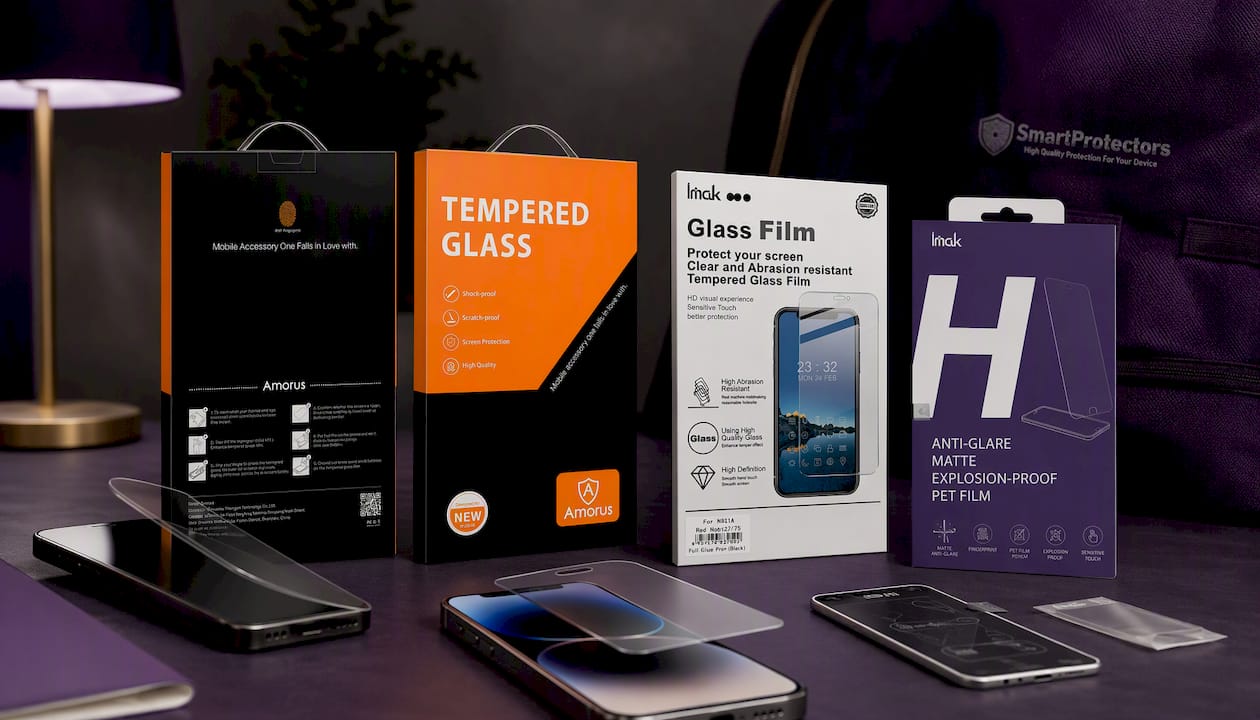
If your phone takes a tempered glass protector, the AMORUS HD Tempered Glass Screen Protector for iPhone 17 shows the standard of fit and clarity you should expect from a proper glass option, while the IMAK H Series Tempered Glass for Nothing Phone (4a) Pro demonstrates how model-specific cutting works on a less mainstream device. Prefer something thinner and less reflective? The Anti-glare Matted PET Film for iPhone 15 Pro Max/15 Plus suits readers who want minimal visual interference over raw hardness.
Measure your screen, search the full screen protectors collection by your exact model, and if it’s genuinely missing, submit a request rather than settling for a mismatched universal sheet. Pair your order with a case for drop protection or a camera lens protector if you’re covering the whole device, all backed by a 30-day return policy if the fit isn’t right.
Sources
- What Kind of Screen Protector Should I Get for My Phone? | PCMag
- Mohs scale of mineral hardness — Wikipedia
- Tekra — Tek Tip: Pencil hardness test
FAQ
What are the downsides of using a screen protector?
A protector adds a thin extra layer between your finger and the screen, which can slightly dull touch sensitivity or colour vibrancy, especially on older, less sensitive panels. Poorly fitted protectors also trap dust, lift at the edges, and can yellow over time, meaning replacement is sometimes needed more often than buyers expect.
Can I put a screen protector on a phone that’s already cracked?
Yes, and it’s a sensible short-term move since a protector can hold loose shards in place and reduce the risk of further spreading. It will not restore touch accuracy or repair the glass underneath, so treat it as a stopgap rather than a fix if the crack affects usability.
Are phone screen protectors necessary anymore?
They’re not strictly necessary on every device, but they remain worthwhile for scratch and light-impact protection, particularly since tempered glass typically rates around 7 to 8 on the Mohs hardness scale and meaningfully outperforms bare glass against everyday scuffs. For an older phone you plan to sell or keep long-term, a protector helps preserve resale condition.
What should I use instead of a screen protector?
A shock-absorbent case with a raised lip around the screen offers better protection against drops than any protector alone, though it does nothing against surface scratches. For genuine peace of mind on an older device, most owners combine a protector for scratch resistance with a case for impact, rather than choosing one over the other.